

Micronaut GraphQL
Learn how to use Micronaut GraphQL.
On this guide
In this section
Getting Started
In this guide, we will create a Micronaut application written in Groovy that uses GraphQL to expose some data.
GraphQL is a query language for APIs and a runtime for fulfilling those queries with your existing data. GraphQL provides a complete and understandable description of the data in your API, gives clients the power to ask for exactly what they need and nothing more, makes it easier to evolve APIs over time, and enables powerful developer tools.
What you will need
To complete this guide, you will need the following:
-
Some time on your hands
-
A decent text editor or IDE (e.g. IntelliJ IDEA)
-
JDK 21 or greater installed with
JAVA_HOMEconfigured appropriately
Solution
We recommend that you follow the instructions in the next sections and create the application step by step. However, you can go right to the completed example.
-
Download and unzip the source
Writing the Application
Create an application using the Micronaut Command Line Interface or with Micronaut Launch.
mn create-app example.micronaut.micronautguide --build=maven --lang=groovy|
Note
|
If you don’t specify the --build argument, Gradle with the Kotlin DSL is used as the build tool. If you don’t specify the --lang argument, Java is used as the language.If you don’t specify the --test argument, JUnit is used for Java and Kotlin, and Spock is used for Groovy.
|
The previous command creates a Micronaut application with the default package example.micronaut in a directory named micronautguide.
GraphQL
Add the following dependency:
<dependency>
    <groupId>io.micronaut.graphql</groupId>
    <artifactId>micronaut-graphql</artifactId>
    <scope>compile</scope>
</dependency>
By default, the GraphQL endpoint /graphql is enabled, so you don’t need to add any extra configuration.
Describe your schema
Create the file schema.graphqls in src/main/resources directory:
Configure Jackson
For Jackson serialization with GraphQL it’s necessary to add the following configuration:
jackson.serialization-inclusion=ALWAYSThis prevents Jackson from removing null or empty values from the response. These are often required by GraphQL clients.
Book and Author classes
Create Book and Author classes that will mimic the data we want to expose:
imports
package example.micronaut

import groovy.transform.Immutable
import io.micronaut.core.annotation.Introspected
@Introspected
@Immutable
class Book {
String id
String name
int pageCount
Author author
}imports
package example.micronaut

import groovy.transform.Immutable
import io.micronaut.core.annotation.Introspected
@Introspected
@Immutable
class Author {
String id
String firstName
String lastName
}Data repository
To keep this example simple, instead of retrieving the information from a database we will keep it in memory and just return it from there. In a real-world example you will use any external storage: relational database, SQL database, etc.
Create DbRepository
Data Fetchers
With a Data Fetcher we bind the GraphQL schema, and our domain model and execute the appropriate queries in our datastore to retrieve the requested data.
Create class GraphQLDataFetchers
Factory
Create the following factory that will bind the GraphQL schema to the code and types.
Running the Application
To run the application, use the ./mvnw mn:run command, which starts the application on port 8080.
We want to execute a GraphQL query to retrieve a book by its id:
query {
  bookById(id:"book-1") {
    name,
    pageCount,
    author {
      firstName
      lastName
    },
  }
}
Run the following curl request:
curl -X POST 'http://localhost:8080/graphql' \
     -H 'content-type: application/json' \
--data-binary '{"query":"{ bookById(id:\"book-1\") { name, pageCount, author { firstName, lastName} } }"}'{"data":{"bookById":{"name":"Harry Potter and the Philosopher's Stone","pageCount":223,"author":{"firstName":"Joanne","lastName":"Rowling"}}}}One of the nice features about GraphQL is that the client can decide the fields, and the order they want to retrieve. Now we send the following request:
curl -X POST 'http://localhost:8080/graphql' \
     -H 'content-type: application/json' \
--data-binary '{"query":"{ bookById(id:\"book-1\") { pageCount, name, id } }"}'{"data":{"bookById":{"pageCount":223,"name":"Harry Potter and the Philosopher's Stone","id":"book-1"}}}Notice that now the application only responds with pageCount, name and id fields, in that order.
Test the application
For testing the application we will use Micronaut HTTP Client to send a POST request to the /graphql endpoint.
Create the following class:
imports
package example.micronaut

import io.micronaut.core.type.Argument
import io.micronaut.http.HttpRequest
import io.micronaut.http.HttpResponse
import io.micronaut.http.HttpStatus
import io.micronaut.http.client.HttpClient
import io.micronaut.http.client.annotation.Client
import io.micronaut.test.extensions.spock.annotation.MicronautTest
import spock.lang.Specification

import jakarta.inject.Inject
@MicronautTest
class GraphQLControllerSpec extends Specification {
@Inject
@Client("/")
HttpClient client
void 'test graphQL controller'() {
when:
def body = makeRequest("book-1")
then:
body.data.bookById.name == "Harry Potter and the Philosopher's Stone"
body.data.bookById.pageCount == 223
body.data.bookById.author.firstName == 'Joanne'
body.data.bookById.author.lastName == 'Rowling'
}
void 'test graphQL controller empty response'() {
when:
def body = makeRequest("missing-id")
then:
body.data.containsKey("bookById")
body.data.bookById == null
}
private Map<String, Object> makeRequest(String id) {
String query = """{ "query": "{ bookById(id:\\"$id\\") { name, pageCount, author { firstName, lastName} } }" }"""
HttpRequest<String> request = HttpRequest.POST('/graphql', query)
HttpResponse<Map<String, Object>> rsp = client.toBlocking().exchange(request, Argument.mapOf(String, Object))
assert rsp.status() == HttpStatus.OK
assert rsp.body()
rsp.body()
}
}To run the tests:
./mvnw testGraphiQL
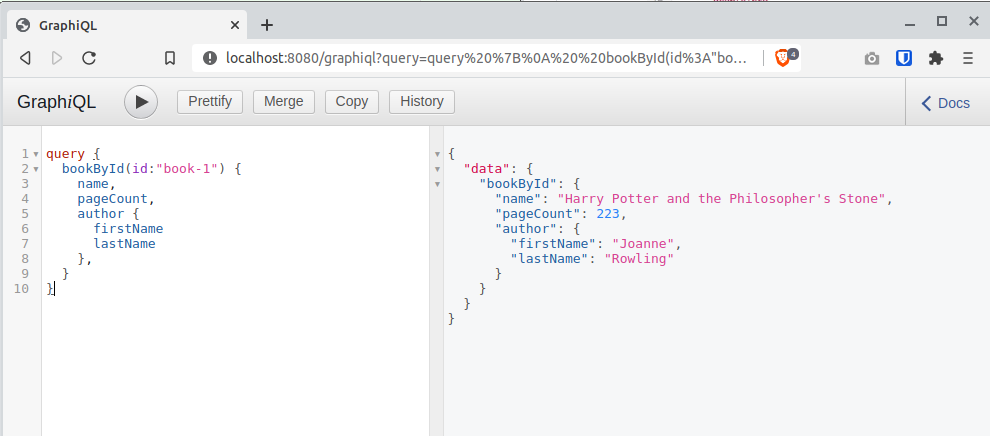
As an extra feature that will help you during development, you can enable GraphiQL. GraphiQL is the GraphQL integrated development environment, and it helps to execute GraphQL queries.
It should only be used for development, so it’s not enabled by default. Add the following configuration to enable it:
graphql.graphiql.enabled=trueStart the application again and open http://localhost:8080/graphiql in your browser. You can write your GraphQL queries with integrated auto-completion and execute them to get the results in an easier and nicer way:
Next Steps
Take a look at the Micronaut GraphQL documentation.
License
|
Note
|
All guides are released with an Apache License 2.0 for the code and a Creative Commons Attribution 4.0 license for the writing and media (images). |