

Creating a ToDo application with Micronaut GraphQL
Build a TODO application with Micronaut GraphQL.
On this guide
In this section
Getting Started
In this guide, you will create a Micronaut application written in Java that uses GraphQL to create a todo application.
GraphQL is a query language for APIs and a runtime for fulfilling those queries with your existing data. GraphQL provides a complete and understandable description of the data in your API, gives clients the power to ask for exactly what they need and nothing more, makes it easier to evolve APIs over time, and enables powerful developer tools.
You will be using:
-
A PostgreSQL instance provided by Test Resources and running in Docker.
-
Micronaut Data to persist our ToDos to this database.
-
Flyway to handle our database migrations.
-
Micronaut GraphQL to expose our data.
-
Testcontainers to run a PostgreSQL instance for local dev, and tests.
The application will expose a GraphQL endpoint at /graphql for the data to be consumed and modified.
What you will need
To complete this guide, you will need the following:
-
Some time on your hands
-
A decent text editor or IDE (e.g. IntelliJ IDEA)
-
JDK 21 or greater installed with
JAVA_HOMEconfigured appropriately
Solution
We recommend that you follow the instructions in the next sections and create the application step by step. However, you can go right to the completed example.
-
Download and unzip the source
Writing the Application
Create an application using the Micronaut Command Line Interface or with Micronaut Launch.
mn create-app example.micronaut.micronautguide \
    --features=graphql,data-jdbc,flyway,postgres,validation,graalvm \
    --build=maven \
    --lang=java \
--test=junit|
Note
|
If you don’t specify the --build argument, Gradle with the Kotlin DSL is used as the build tool. If you don’t specify the --lang argument, Java is used as the language.If you don’t specify the --test argument, JUnit is used for Java and Kotlin, and Spock is used for Groovy.
|
The previous command creates a Micronaut application with the default package example.micronaut in a directory named micronautguide.
If you use Micronaut Launch, select Micronaut Application as application type and add graphql, data-jdbc, flyway, postgres, validation, and graalvm features.
|
Note
|
If you have an existing Micronaut application and want to add the functionality described here, you can view the dependency and configuration changes from the specified features, and apply those changes to your application. |
Persistence layer
Database Migration with Flyway
We need a way to create the database schema. For that, we use Micronaut integration with Flyway.
Flyway automates schema changes, significantly simplifying schema management tasks, such as migrating, rolling back, and reproducing in multiple environments.
Add the following snippet to include the necessary dependencies:
<dependency>
    <groupId>io.micronaut.flyway</groupId>
    <artifactId>micronaut-flyway</artifactId>
    <scope>compile</scope>
</dependency>
We will enable Flyway in the Micronaut configuration file and configure it to perform migrations on one of the defined data sources.
|
Note
|
Configuring multiple data sources is as simple as enabling Flyway for each one. You can also specify directories that will be used for migrating each data source. Review the Micronaut Flyway documentation for additional details. |
Flyway migration will be automatically triggered before your Micronaut application starts. Flyway will read migration commands in the resources/db/migration/ directory, execute them if necessary, and verify that the configured data source is consistent with them.
Create the following migration files with the database schema creation:
Entities
Create an Entity class to represent an Author:
And another to represent a ToDo:
Repositories
Create a JdbcRepository for each of our Entity classes.
The simplest of these is the ToDoRepository which just requires the default methods:
Then create a repository for the authors. This requires extra finders to simplify the GraphQL wiring in the next step:
GraphQL
The initial Micronaut application create-app step already added the GraphQL dependency:
<dependency>
    <groupId>io.micronaut.graphql</groupId>
    <artifactId>micronaut-graphql</artifactId>
    <scope>compile</scope>
</dependency>
So the default GraphQL endpoint /graphql is enabled, and extra configuration is not required.
Describe your schema
Create the file schema.graphqls:
Data Fetchers
For each query and mutator in the schema, create a DataFetcher which will bind the GraphQL schema to our domain model.
These will execute the appropriate queries in the datastore.
Queries
Create class ToDosDataFetcher to implement the toDos query:
Mutations
Create CreateToDoDataFetcher for the creation of ToDos:
And CompleteToDoDataFetcher to mark ToDos as complete:
Wiring
GraphQL allows data to be fetched on demand. In this example, a user may request a list of ToDos, but not require the author to be populated. A method is required to optionally load Authors based on their ID.
To do this, register a DataLoader that finds authors based on a collection of ids:
This is registered in the DataLoaderRegistry under the key author
Add an AuthorDataFetcher which requests and uses this loader to populate a ToDo with the author when required.
GraphQL Factory
Finally, create a factory class that will bind the GraphQL schema to the code, types and fetchers.
Test Resources
When the application is started locally, either under test or while running locally, resolution of the datasource URL is detected and the Test Resources service will start a local PostgreSQL docker container, and inject the properties required to use this as the datasource.
For more information, see the JDBC section of the Test Resources documentation.
Running the Application
To run the application, use the ./mvnw mn:run command, which starts the application on port 8080.
When the application first runs, you will see in the logs that the migrations have been performed.
Test the application
Manual smoke tests
Formulate a GraphQL query to retrieve all the current ToDos (there will be none to start with)
query {
  toDos {
    title,
    completed,
    author {
       username
    }
  }
}
Run the following cURL request:
curl -X POST 'http://localhost:8080/graphql' \
     -H 'content-type: application/json' \
--data-binary '{"query":"{ toDos { title, completed, author { username } } }"}'{"data":{"toDos":[]}}Create a ToDo, by issuing a mutation query and return the ID of the newly created ToDo:
mutation {
  createToDo(title: "Create GraphQL Guide", author: "Tim Yates") {
    id
  }
}
Which translates to this cURL command:
curl -X POST 'http://localhost:8080/graphql' \
     -H 'content-type: application/json' \
--data-binary '{"query":"mutation { createToDo(title:\"Create GraphQL Guide\", author:\"Tim Yates\") { id } }"}'{"data":{"createToDo":{"id":"1"}}}This new ToDo then appears in the list of all ToDos with completed set to false:
curl -X POST 'http://localhost:8080/graphql' \
     -H 'content-type: application/json' \
--data-binary '{"query":"{ toDos { title, completed, author { username } } }"}'{"data":{"toDos":[{"title":"Create GraphQL Guide","completed":false,"author":{"username":"Tim Yates"}}]}}Mark it as completed by using this query with the ID from above:
mutation {
  completeToDo(id: 1)
}curl -X POST 'http://localhost:8080/graphql' \
-H 'content-type: application/json' \
--data-binary '{"query":"mutation { completeToDo(id: 1) }"}'{"data":{"completeToDo":true}}Check this has been persisted in our model:
curl -X POST 'http://localhost:8080/graphql' \
     -H 'content-type: application/json' \
--data-binary '{"query":"{ toDos { title, completed } }"}'{"data":{"toDos":[{"title":"Create GraphQL Guide","completed":true}]}}Automated tests
For testing the application use the Micronaut HTTP Client to send a POST request to the /graphql endpoint.
Create the following class:
To run the tests:
./mvnw testGraphiQL
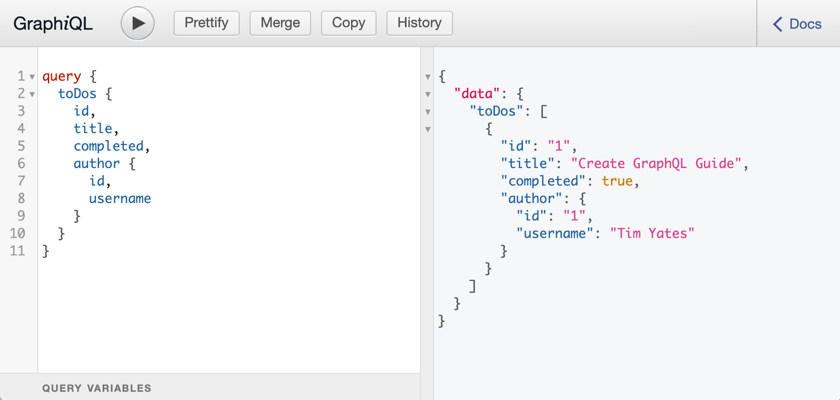
As an extra feature that will help during development, you can enable GraphiQL. GraphiQL is the GraphQL integrated development environment, and it executes GraphQL queries.
It should only be used for development, so it’s not enabled by default. Add the following configuration to enable it:
graphql.graphiql.enabled=trueStart the application again and open http://localhost:8080/graphiql in a browser. GraphQL queries can be executed with integrated auto-completion:
Generate a Micronaut Application Native Executable with GraalVM
We will use GraalVM, an advanced JDK with ahead-of-time Native Image compilation, to generate a native executable of this Micronaut application.
Compiling Micronaut applications ahead of time with GraalVM significantly improves startup time and reduces the memory footprint of JVM-based applications.
|
Note
|
Only Java and Kotlin projects support using GraalVM’s native-image tool. Groovy relies heavily on reflection, which is only partially supported by GraalVM.
|
GraalVM Installation
sdk install java 25.4.4+1-graalFor installation on Windows, or for a manual installation on Linux or Mac, see the GraalVM Getting Started documentation.
The previous command installs Oracle GraalVM, which is free to use in production and free to redistribute, at no cost, under the GraalVM Free Terms and Conditions.
Alternatively, you can use the GraalVM Community Edition:
sdk install java 25.4.4.1+1-graalceNative Executable Generation
To generate a native executable using Maven, run:
./mvnw package -Dpackaging=native-imageThe native executable is created in the target directory and can be run with target/micronautguide.
It is possible to customize the name of the native executable or pass additional build arguments using the Maven plugin for GraalVM Native Image building. Declare the plugin as follows:
Start the native executable and execute the same cURL request as before. You can also use the included GraphiQL browser to execute the queries.
Next Steps
Take a look at the Micronaut GraphQL documentation.
License
|
Note
|
All guides are released with an Apache License 2.0 for the code and a Creative Commons Attribution 4.0 license for the writing and media (images). |