

Secure a Micronaut application with GitHub
Learn how to create a Micronaut application and secure it with an Authorization Server provided by GitHub. Learn how to write your own Authentication Mapper.
On this guide
In this section
Getting Started
In this guide, we will create a Micronaut application written in Groovy.
What you will need
To complete this guide, you will need the following:
-
Some time on your hands
-
A decent text editor or IDE (e.g. IntelliJ IDEA)
-
JDK 21 or greater installed with
JAVA_HOMEconfigured appropriately
Solution
We recommend that you follow the instructions in the next sections and create the application step by step. However, you can go right to the completed example.
-
Download and unzip the source
Writing the Application
Create an application using the Micronaut Command Line Interface or with Micronaut Launch.
mn create-app example.micronaut.micronautguide \
    --features=views-thymeleaf,security-oauth2,security-jwt,reactor,serialization-jackson,http-client \
    --build=maven \
    --lang=groovy \
--test=spock|
Note
|
If you don’t specify the --build argument, Gradle with the Kotlin DSL is used as the build tool. If you don’t specify the --lang argument, Java is used as the language.If you don’t specify the --test argument, JUnit is used for Java and Kotlin, and Spock is used for Groovy.
|
The previous command creates a Micronaut application with the default package example.micronaut in a directory named micronautguide.
If you use Micronaut Launch, select Micronaut Application as application type and add views-thymeleaf, security-oauth2, security-jwt, reactor, serialization-jackson, and http-client features.
|
Note
|
If you have an existing Micronaut application and want to add the functionality described here, you can view the dependency and configuration changes from the specified features, and apply those changes to your application. |
Views
Although the Micronaut framework is primarily designed around message encoding / decoding, there are occasions where it is convenient to render a view on the server side.
We’ll use the Thymeleaf Java template engine to render views.
Home
Create a controller to handle the requests to /. You will display the email of the authenticated person if any. Annotate the controller endpoint with @View since we will use a Thymeleaf template.
Create a Thymeleaf template:
<!DOCTYPE html>
<html xmlns:th="http://www.thymeleaf.org">
<head>
    <title>Home</title>
</head>
<body>
    <h1>Micronaut - GitHub example</h1>

<h2 th:if="${security}">username: <span th:text="${security.name}"> </h2>
<h2 th:unless="${security}">username: Anonymous</h2>

<nav>
    <ul>
        <li th:unless="${security}"><a href="/oauth/login/github">Enter</a></li>
        <li th:if="${security}"><a href="/repos">View Repos</a></li>
        <li th:if="${security}"><a href="/logout">Logout</a></li>
    </ul>
</nav>
</body>
</html>
Also, note that we return an empty model in the controller. However, we are accessing security in the Thymeleaf template.
-
The SecurityViewModelProcessor injects into the model a
securitymap with the authenticated user. See User in a view documentation.
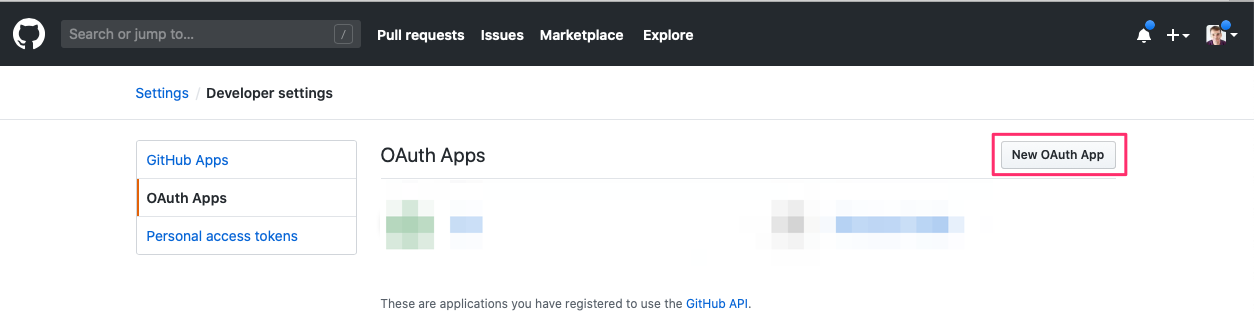
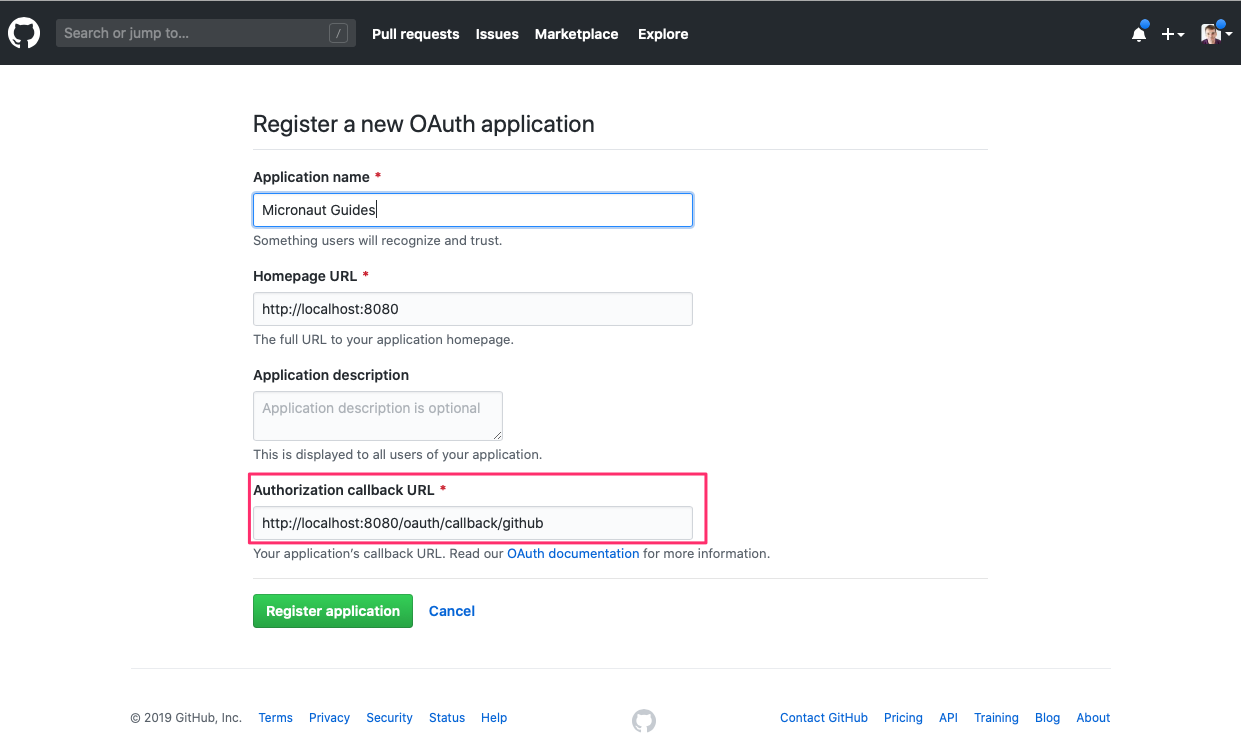
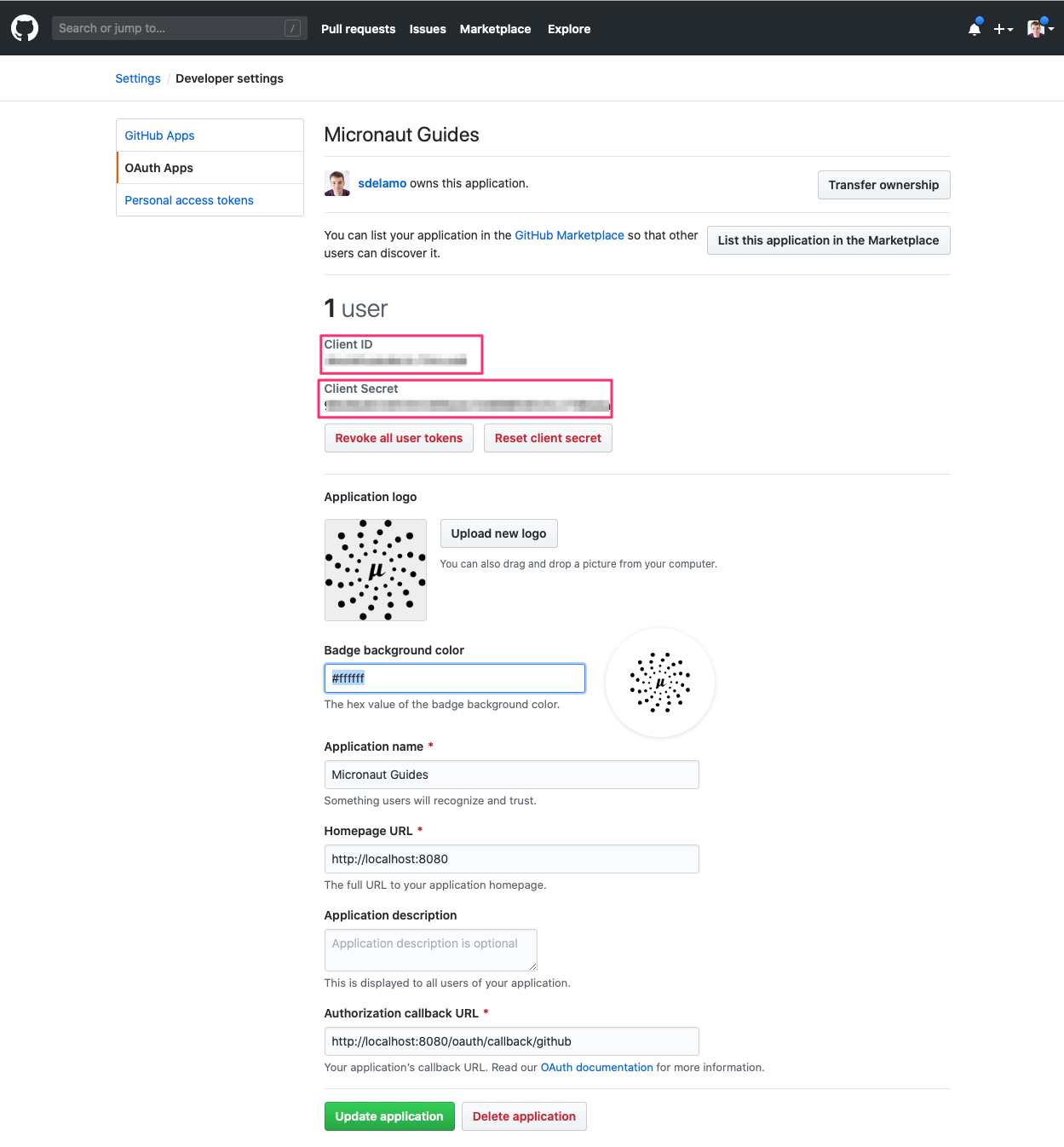
OAuth 2.0 Configuration
Add the following OAuth 2.0 configuration:
The previous configuration uses several placeholders. You will need to set up the OAUTH_CLIENT_ID and OAUTH_CLIENT_SECRET environment variables.
export OAUTH_CLIENT_ID=XXXXXXXXXX
export OAUTH_CLIENT_SECRET=YYYYYYYYYY
User Details Mapper
Here is a high level diagram of how the authorization code grant flow works with an OAuth 2.0 provider such as GitHub.
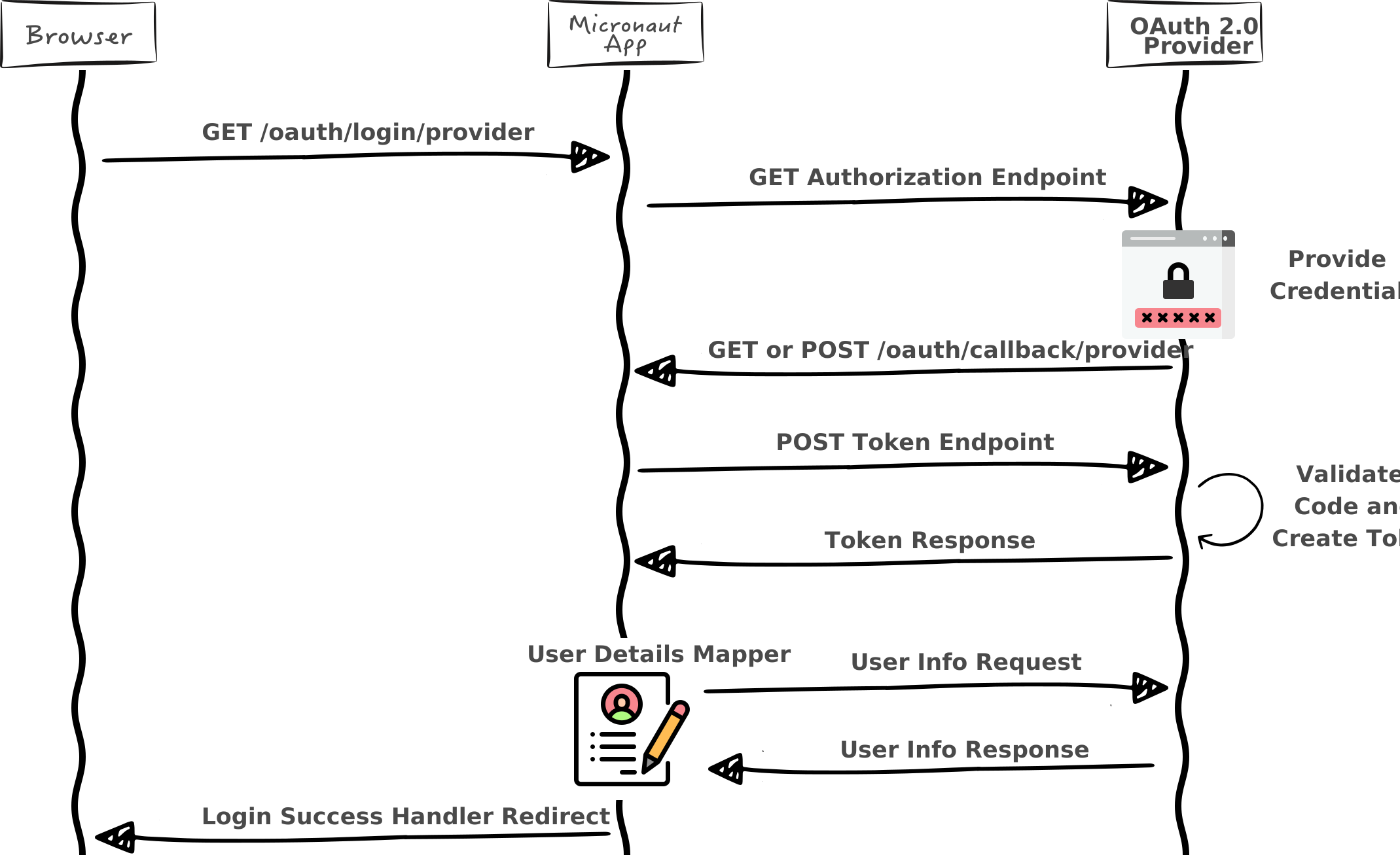
We need an HTTP Client to retrieve the user info. Create a POJO to represent a GitHub user:
imports
package example.micronaut

import groovy.transform.CompileStatic
import io.micronaut.serde.annotation.Serdeable
@CompileStatic
@Serdeable
class GithubUser {
final String login
final String name
final String email
GithubUser(String login, String name, String email) {
this.login = login
this.name = name
this.email = email
}
}Then, create a Micronaut Declarative HTTP Client to consume GitHub REST API v3
Specify the URL for the githubv3 service.
micronaut.http.services.githubv3.url=https://api.github.comFor GitHub, we need to provide an authentication mapper. The easiest way is to create a bean that implements OauthAuthenticationMapper.
Retrieve User GitHub repositories
With the access token retrieved during login, we will contact the GitHub API to fetch the user’s repositories.
First, create a POJO to represent a GitHub repository:
imports
package example.micronaut

import groovy.transform.CompileStatic
import io.micronaut.serde.annotation.Serdeable
@CompileStatic
@Serdeable
class GithubRepo {
final String name
GithubRepo(String name) {
this.name = name
}
}Add a method to GithubApiClient
Create a controller to expose /repos endpoint:
Create a Thymeleaf template:
<!DOCTYPE html>
<html xmlns:th="http://www.thymeleaf.org">
<head>
<title>Home</title>
</head>
<body>
<h1><a href="/">Home</a> → Repositories</h1>
<nav>
<ul th:each="repo: ${repos}">
<li th:text="${repo.name}"/>
</ul>
</nav>
</body>
</html>Running the Application
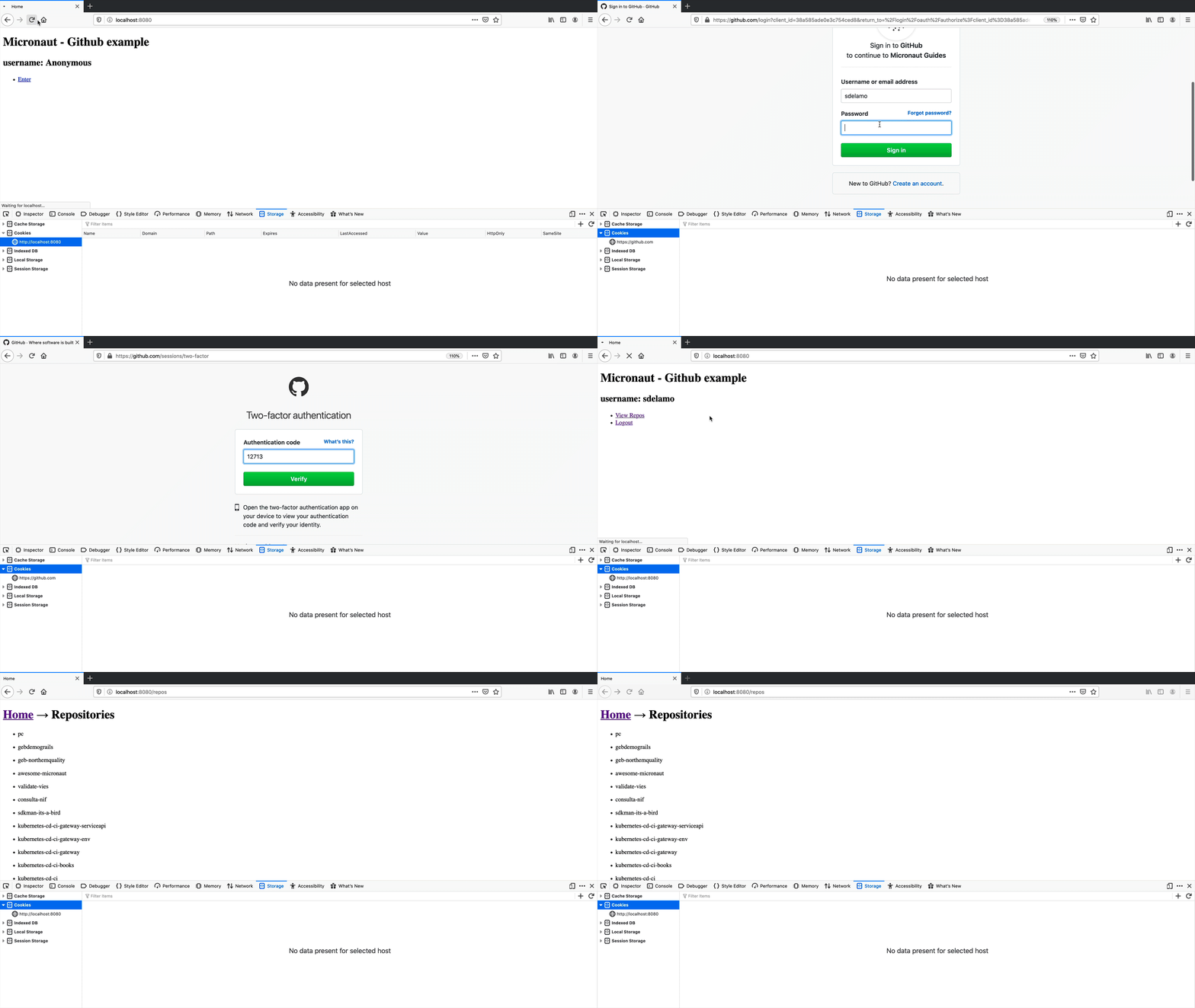
To run the application, use the ./mvnw mn:run command, which starts the application on port 8080.
Next Steps
Read Micronaut OAuth 2.0 documentation to learn more.
License
|
Note
|
All guides are released with an Apache License 2.0 for the code and a Creative Commons Attribution 4.0 license for the writing and media (images). |