

Oracle Cloud Streaming and the Micronaut Framework - Event-Driven Applications at Scale
Use Oracle Cloud Streaming to communicate between your Micronaut applications.
On this guide
In this section
Getting Started
In this guide, we will create two Micronaut microservices written in Java that will use Oracle Cloud Streaming to communicate with each other in an asynchronous and decoupled way.
What You Will Need
To complete this guide, you will need the following:
-
Some time on your hands
-
A decent text editor or IDE
-
JDK 25 or greater installed with
JAVA_HOMEconfigured appropriately -
An Oracle Cloud account (create a free trial account at signup.oraclecloud.com)
-
Oracle Cloud CLI installed with local access to Oracle Cloud configured by running
oci setup config -
Docker and Docker Compose installed if you will be running Kafka in Docker and for running tests.
Solution
We recommend that you follow the instructions in the next sections and create the application step by step. However, you can go right to the completed example.
-
Download and unzip the source
Writing the Application
The microservices will use Oracle Cloud Streaming and the Kafka API to send and receive messages. The messages will represent chess gameplay events, including game start and end and each move.
The microservices are:
-
chess-game- Has a simple JavaScript and Ajax UI that renders a variable number of chess games that will be auto-played to generate many events -
chess-listener- Receives the chess event messages and persists them to a database
chess-game Microservice
Create the chess-game microservice using the Micronaut Command Line Interface or with Micronaut Launch.
mn create-app --features=kafka,graalvm,reactor,testcontainers example.micronaut.chess-game --build=gradle --lang=java|
Note
|
If you don’t specify the --build argument, Gradle with the Kotlin DSL is used as the build tool. If you don’t specify the --lang argument, Java is used as the language.If you don’t specify the --test argument, JUnit is used for Java and Kotlin, and Spock is used for Groovy.
|
If you use Micronaut Launch, select Micronaut Application as application type and add the kafka, graalvm, reactor, and testcontainers features.
The previous command creates a directory named chess-game and a Micronaut application inside it with default package example.micronaut.
In addition to the dependencies added by the testcontainers feature, we also need a test dependency for Kafka in Testcontainers, along with one for the Awaitility library:
testImplementation("org.testcontainers:testcontainers-kafka")
testImplementation("org.awaitility:awaitility:4.3.0")
DTOs
Create an enum for the chess players:
imports
package example.micronaut.chess.dto;

import com.fasterxml.jackson.annotation.JsonValue;
public enum Player {
WHITE("w"),
BLACK("b");
private final String color;
Player(String color) {
this.color = color;
}
@JsonValue
public String toString() {
return color;
}
}Create a GameDTO data-transfer object to represent game data:
Create a GameStateDTO data-transfer object to represent game move data:
GameReporter
Create a GameReporter Kafka client to send chess-related messages:
GameController
Create a GameController class to contain Ajax endpoints for the front end:
Development environment
Modify the Application class to use dev as a default environment:
The Micronaut framework supports the concept of one or many default environments. A default environment is one that is only applied if no other environments are explicitly specified or deduced.
imports
package example.micronaut;

import io.micronaut.runtime.Micronaut;

import static io.micronaut.context.env.Environment.DEVELOPMENT;
public class Application {
public static void main(String[] args) {
Micronaut.build(args)
.mainClass(Application.class)
.defaultEnvironments(DEVELOPMENT)
.start();
}
}Delete the kafka.bootstrap.servers config option from application.properties and move it to application-dev.properties.
Create @dev-configuration-file@. The Micronaut framework applies this configuration file only when the dev environment is active.
Static Resources
Update application.properties to add static resource configuration:
UI Resources
Create index.html with the simple chess game UI:
<!doctype html>
<html lang="en">
<head>
<meta charset="utf-8">
<meta http-equiv="X-UA-Compatible" content="IE=edge">
<title>Micronaut Chess Multi</title>
<meta name="viewport" content="width=device-width, initial-scale=1">
<link rel="shortcut icon" type="image/png" href="favicon-32x32.png">
<link rel="stylesheet"
href="https://unpkg.com/@chrisoakman/chessboardjs@1.0.0/dist/chessboard-1.0.0.min.css"
integrity="sha384-q94+BZtLrkL1/ohfjR8c6L+A6qzNH9R2hBLwyoAfu3i/WCvQjzL2RQJ3uNHDISdU"
crossorigin="anonymous">
<style>
.gamesRow {
width: 100%;
margin: 0 auto;
}
.gameContainer {
display: inline-block;
}
</style>
</head>
<body>
<div id="counts">
<div>
<label for="rowCount">Rows: </label><input type="number" value="1" min="1" max="10" id="rowCount">
</div>
<div>
<label for="gamesPerRow">Games per row: </label><input type="number" value="1" min="1" max="10" id="gamesPerRow">
</div>
<div>
<label for="playDelay">Play delay milliseconds: </label><input type="number" value="5" min="1" id="playDelay">
</div>
<div>
<button id="startButton">START</button>
</div>
</div>
<div id="gamesContainer"></div>
<script src="https://code.jquery.com/jquery-3.5.1.min.js"
integrity="sha384-ZvpUoO/+PpLXR1lu4jmpXWu80pZlYUAfxl5NsBMWOEPSjUn/6Z/hRTt8+pR6L4N2"
crossorigin="anonymous"></script>
<script src="https://unpkg.com/@chrisoakman/chessboardjs@1.0.0/dist/chessboard-1.0.0.min.js"
integrity="sha384-8Vi8VHwn3vjQ9eUHUxex3JSN/NFqUg3QbPyX8kWyb93+8AC/pPWTzj+nHtbC5bxD"
crossorigin="anonymous"></script>
<script src="https://cdnjs.cloudflare.com/ajax/libs/chess.js/0.12.0/chess.min.js"
integrity="sha512-ujGsB4vTyNcSuViwM2DJ0+G2BIViQJl2rVBZBekStznA9Hq96+Wd9+jwu9zlttp0U2/9CYhgR7pOt2j+E6yewg=="
crossorigin="anonymous" referrerpolicy="no-referrer"></script>
<script src="micronaut-chess.js"></script>
</body>
</html>The HTML page includes the chessboard.js JavaScript library to create a chess board and the chess.js JavaScript library for chess game logic.
Create micronaut-chess.js used by index.html with the JavaScript code:
function updateStatus(n, started) {

    if (started) {
        onMove(n);
    }

    const game = GAMES[n];
    if (game.in_checkmate()) {
        onCheckmate(n);
    }
    else if (game.in_draw()) {
        onDraw(n);
    }
}

function onGameStart(n) {
    $.post('/game/start', { b: BLACK_NAMES[n], w: WHITE_NAMES[n]}, function (data) {
        const gameId = data;
        GAME_IDS[n] = gameId;
        $('#gameId' + n).text('Game ID: ' + gameId);
        window.setTimeout(function () {
            makeRandomMove(n);
        }, 2000); // delay a bit so the Game is persisted
    });
}

function onMove(n) {
    const game = GAMES[n];
    const history = game.history();
    const move = history[history.length - 1];

    $.post('/game/move/' + GAME_IDS[n], {
        player: other(n),
        fen: game.fen(),
        pgn: game.pgn(),
        move: move
    });
}

function onCheckmate(n) {
    const winner = other(n);
    $.post('/game/checkmate/' + GAME_IDS[n] + '/' + winner);
}

function onDraw(n) {
    $.post('/game/draw/' + GAME_IDS[n]);
}

function other(n) {
    return GAMES[n].turn() === 'b' ? 'w' : 'b';
}

function makeRandomMove(n) {

    const game = GAMES[n];

    if (game.game_over()) {
        restart(n);
        return;
    }

    const possibleMoves = game.moves();
    const moveIndex = Math.floor(Math.random() * possibleMoves.length);
    game.move(possibleMoves[moveIndex]);
    BOARDS[n].position(game.fen());
    updateStatus(n, true);

    window.setTimeout(function () {
        makeRandomMove(n);
    }, playDelay);
}

function restart(n) {
    BOARDS[n].position(FEN_INITIAL);
    GAMES[n].load(FEN_INITIAL);
    updateStatus(n, false);
    onGameStart(n);
}

function startGames() {
    $('#counts').toggle();

    playDelay = parseInt($('#playDelay').val(), 10);

    const rowCount = parseInt($('#rowCount').val(), 10);
    const gamesPerRow = parseInt($('#gamesPerRow').val(), 10);
    const hWidth = (window.innerWidth - 50) / gamesPerRow;
    const vWidth = window.innerHeight / rowCount - 50;
    const gameWidth = Math.min(400, hWidth, vWidth);

    for (let r = 0; r < rowCount; r++) {

        const gamesContainer = $('#gamesContainer');
        gamesContainer.append(
            '<div id="gamesRow' + r + '" class="gamesRow"></div>'
        );

        for (let c = 0; c < gamesPerRow; c++) {

            const n = r * gamesPerRow + c;

            const gamesRow = $('#gamesRow' + r);
            gamesRow.append(
                '<div class="gameContainer" style="width: ' + gameWidth + 'px">' +
                '<div id="chessboard' + n + '"></div>' +
                '<div><span id="gameId' + n + '"></span></div>' +
                '</div>'
            );

            GAMES[n] = new Chess();
            BLACK_NAMES[n] = 'b' + n;
            WHITE_NAMES[n] = 'w' + n;

            BOARDS[n] = Chessboard('chessboard' + n, {
                position: 'start',
                appearSpeed: 0,
                moveSpeed: 0
            });

            updateStatus(n, false);
            onGameStart(n);
        }
    }
}

const FEN_INITIAL = 'rnbqkbnr/pppppppp/8/8/8/8/PPPPPPPP/RNBQKBNR w KQkq - 0 1';
const GAME_IDS = [];
const BOARDS = [];
const BLACK_NAMES = [];
const WHITE_NAMES = [];
const GAMES = [];
let playDelay = 5;

$('#startButton').on('click', startGames);
Copy these chess piece images to src/main/resources/public/img/chesspieces/wikipedia (the path must be correct because it is hard-coded in chessboard.js):


Right-click each image and save to your local file system, or extract the completed example zip file linked above and get them from there.
chess-listener Microservice
Create the chess-listener microservice using the Micronaut Command Line Interface or with Micronaut Launch.
mn create-app --features=kafka,graalvm,data-jdbc,flyway,reactor,testcontainers example.micronaut.chess-listener --build=gradle --lang=java|
Note
|
If you don’t specify the --build argument, Gradle with the Kotlin DSL is used as the build tool. If you don’t specify the --lang argument, Java is used as the language.If you don’t specify the --test argument, JUnit is used for Java and Kotlin, and Spock is used for Groovy.
|
If you use Micronaut Launch, select Micronaut Application as application type and add the kafka, graalvm, data-jdbc, flyway, reactor, and testcontainers features.
The previous command creates a directory named chess-listener and a Micronaut application inside it with default package example.micronaut.
In addition to the dependencies added by the testcontainers feature, we also need a test dependency for Kafka and Oracle in Testcontainers, along with one for the Awaitility library:
testImplementation("org.testcontainers:testcontainers-kafka")
testImplementation("org.testcontainers:testcontainers-oracle-xe")
testImplementation("org.awaitility:awaitility:4.3.0")
Flyway
Enable Flyway database migrations for all environments by adding this configuration to application.properties:
flyway.datasources.default.enabled=trueDTOs
The same data transfer objects (GameDTO and GameStateDTO…) as above in the chess-game microservice. In a real application, these would be in a shared library, but to keep things simple, we’ll just duplicate them.
Entity Classes
Create a Game entity to represent persistent game data:
imports
package example.micronaut.chess.entity;

import example.micronaut.chess.dto.Player;
import example.micronaut.chess.dto.GameDTO;
import io.micronaut.core.annotation.NonNull;
import io.micronaut.core.annotation.Nullable;
import io.micronaut.data.annotation.DateCreated;
import io.micronaut.data.annotation.DateUpdated;
import io.micronaut.data.annotation.Id;
import io.micronaut.data.annotation.MappedEntity;

import jakarta.validation.constraints.NotNull;
import jakarta.validation.constraints.Size;
import java.time.LocalDateTime;
import java.util.UUID;@MappedEntity("GAME")
public class Game {
@Id
@NotNull
@NonNull
private final UUID id;
@Size(max = 255)
@NonNull
private final String blackName;
@Size(max = 255)
@NonNull
private final String whiteName;
@DateCreated
private LocalDateTime dateCreated;
@DateUpdated
private LocalDateTime dateUpdated;
private boolean draw;
@Nullable
@Size(max = 1)
private Player winner;
public Game(@NonNull UUID id,
@NonNull String blackName,
@NonNull String whiteName) {
this.id = id;
this.blackName = blackName;
this.whiteName = whiteName;
}
@NonNull
public UUID getId() {
return id;
}
@NonNull
public String getBlackName() {
return blackName;
}
@NonNull
public String getWhiteName() {
return whiteName;
}
public LocalDateTime getDateCreated() {
return dateCreated;
}
public void setDateCreated(LocalDateTime dateCreated) {
this.dateCreated = dateCreated;
}
public LocalDateTime getDateUpdated() {
return dateUpdated;
}
public void setDateUpdated(LocalDateTime dateUpdated) {
this.dateUpdated = dateUpdated;
}
public boolean isDraw() {
return draw;
}
public void setDraw(boolean draw) {
this.draw = draw;
}
public Player getWinner() {
return winner;
}
public void setWinner(Player winner) {
this.winner = winner;
}
@NonNull
public GameDTO toDto() {
return new GameDTO(id.toString(), blackName, whiteName, draw, winner);
}
}Create a GameState entity to represent persistent game move data:
imports
package example.micronaut.chess.entity;

import example.micronaut.chess.dto.Player;
import example.micronaut.chess.dto.GameStateDTO;
import io.micronaut.data.annotation.DateCreated;
import io.micronaut.data.annotation.Id;
import io.micronaut.data.annotation.MappedEntity;
import io.micronaut.core.annotation.NonNull;
import io.micronaut.data.annotation.Relation;

import jakarta.validation.constraints.NotNull;
import jakarta.validation.constraints.Size;
import java.time.LocalDateTime;
import java.util.UUID;

import static io.micronaut.data.annotation.Relation.Kind.MANY_TO_ONE;@MappedEntity("GAME_STATE")
public class GameState {
@Id
@NotNull
@NonNull
private final UUID id;
@Relation(MANY_TO_ONE)
@NotNull
@NonNull
private final Game game;
@DateCreated
private LocalDateTime dateCreated;
@Size(max = 1)
@NotNull
@NonNull
private final Player player;
// https://en.wikipedia.org/wiki/Forsyth%E2%80%93Edwards_Notation
@Size(max = 100)
@NotNull
@NonNull
private final String fen;
// https://en.wikipedia.org/wiki/Portable_Game_Notation
@NotNull
@NonNull
private final String pgn;
@Size(max = 10)
@NotNull
@NonNull
private final String move;
public GameState(@NonNull UUID id,
@NonNull Game game,
@NonNull Player player,
@NonNull String move,
@NonNull String fen,
@NonNull String pgn) {
this.id = id;
this.game = game;
this.player = player;
this.move = move;
this.fen = fen;
this.pgn = pgn;
}
@NonNull
public UUID getId() {
return id;
}
@NonNull
public Game getGame() {
return game;
}
public LocalDateTime getDateCreated() {
return dateCreated;
}
public void setDateCreated(LocalDateTime dateCreated) {
this.dateCreated = dateCreated;
}
@NonNull
public Player getPlayer() {
return player;
}
@NonNull
public String getFen() {
return fen;
}
@NonNull
public String getPgn() {
return pgn;
}
@NonNull
public String getMove() {
return move;
}
@NonNull
public GameStateDTO toDto() {
return new GameStateDTO(id.toString(), game.getId().toString(), player, move, fen, pgn);
}
}Repositories
Create a "base" GameRepository interface to have access to methods for Game entity persistence:
imports
package example.micronaut.chess.repository;

import example.micronaut.chess.entity.Game;
import io.micronaut.data.repository.CrudRepository;

import java.util.UUID;
public interface GameRepository extends CrudRepository<Game, UUID> {
}and a H2GameRepository interface that extends GameRepository and specifies the H2 dialect to use an in-memory H2 database in the development environment (we’ll also be creating an Oracle repository):
Create a "base" GameStateRepository interface to have access to methods for GameState entity persistence:
Also create a H2GameStateRepository interface that extends GameStateRepository:
imports
package example.micronaut.chess.repository;

import io.micronaut.context.annotation.Primary;
import io.micronaut.context.annotation.Requires;
import io.micronaut.data.jdbc.annotation.JdbcRepository;

import static io.micronaut.context.env.Environment.DEVELOPMENT;
import static io.micronaut.data.model.query.builder.sql.Dialect.H2;@Primary
@JdbcRepository(dialect = H2)
@Requires(env = DEVELOPMENT)
public interface H2GameStateRepository extends GameStateRepository {
}GameService
Create GameService to coordinate transactional persistence using GameRepository and GameStateRepository:
imports
package example.micronaut.chess;

import example.micronaut.chess.dto.GameDTO;
import example.micronaut.chess.dto.GameStateDTO;
import example.micronaut.chess.entity.Game;
import example.micronaut.chess.entity.GameState;
import example.micronaut.chess.repository.GameRepository;
import example.micronaut.chess.repository.GameStateRepository;
import org.slf4j.Logger;
import org.slf4j.LoggerFactory;
import io.micronaut.core.annotation.NonNull;
import jakarta.inject.Singleton;
import jakarta.transaction.Transactional;
import java.util.UUID;@Singleton
@Transactional
public class GameService {
private final Logger log = LoggerFactory.getLogger(GameService.class.getName());
private final GameRepository gameRepository;
private final GameStateRepository gameStateRepository;
GameService(GameRepository gameRepository,
GameStateRepository gameStateRepository) {
this.gameRepository = gameRepository;
this.gameStateRepository = gameStateRepository;
}
public Game newGame(GameDTO gameDTO) {
log.debug("New game {}, black: {}, white: {}",
gameDTO.getId(), gameDTO.getBlackName(), gameDTO.getWhiteName());
Game game = new Game(UUID.fromString(gameDTO.getId()),
gameDTO.getBlackName(), gameDTO.getWhiteName());
return gameRepository.save(game);
}
public void newGameState(GameStateDTO gameStateDTO) {
Game game = findGame(gameStateDTO.getGameId());
GameState gameState = new GameState(
UUID.fromString(gameStateDTO.getId()), game,
gameStateDTO.getPlayer(), gameStateDTO.getMove(),
gameStateDTO.getFen(), gameStateDTO.getPgn());
gameStateRepository.save(gameState);
}
public void checkmate(GameDTO gameDTO) {
log.debug("Game {} ended with winner: {}",
gameDTO.getId(), gameDTO.getWinner());
Game game = findGame(gameDTO.getId());
game.setWinner(gameDTO.getWinner());
gameRepository.update(game);
}
public void draw(GameDTO gameDTO) {
log.debug("Game {} ended in a draw", gameDTO.getId());
Game game = findGame(gameDTO.getId());
game.setDraw(true);
gameRepository.update(game);
}
@NonNull
private Game findGame(String gameId) {
return gameRepository.findById(UUID.fromString(gameId)).orElseThrow(() ->
new IllegalArgumentException("Game with id '" + gameId + "' not found"));
}
}ChessListener
Create ChessListener Kafka listener to receive messages sent from the chess-game microservice:
Development environment
Modify the Application class to use dev as a default environment:
The Micronaut framework supports the concept of one or many default environments. A default environment is one that is only applied if no other environments are explicitly specified or deduced.
imports
package example.micronaut;

import io.micronaut.runtime.Micronaut;

import static io.micronaut.context.env.Environment.DEVELOPMENT;
public class Application {
public static void main(String[] args) {
Micronaut.build(args)
.mainClass(Application.class)
.defaultEnvironments(DEVELOPMENT)
.start();
}
}Create @dev-configuration-file@. The Micronaut framework applies this configuration file only when the dev environment is active.
H2 Flyway Migration Script
Create a database migration script to create the database tables:
CREATE TABLE game (
    id CHAR(36) PRIMARY KEY,
    black_name VARCHAR(255) NOT NULL,
    white_name VARCHAR(255) NOT NULL,
    date_created TIMESTAMP NOT NULL,
    date_updated TIMESTAMP NOT NULL,
    draw BOOLEAN NOT NULL,
    winner CHAR(1)
);

CREATE TABLE game_state (
    id CHAR(36) PRIMARY KEY,
    game_id CHAR(36) NOT NULL,
    date_created TIMESTAMP NOT NULL,
    player CHAR(1) NOT NULL,
    fen VARCHAR(100) NOT NULL,
    pgn CLOB NOT NULL,
    move VARCHAR(10) NOT NULL,
    CONSTRAINT fk_game_state_game FOREIGN KEY (game_id) REFERENCES game(id)
);
Kafka
We’ll use Oracle Cloud Streaming in the "real" application, but for local development, we can use a local Kafka instance.
Install Kafka
A fast way to start using Kafka is via Docker. Create this docker-compose.yml file:
Start ZooKeeper and Kafka (use CTRL-C to stop both):
docker-compose upAlternatively you can install and run a local Kafka instance.
Running the application
Start the chess-game microservice:
./gradlew run16:35:55.614 [main] INFO io.micronaut.runtime.Micronaut - Startup completed in 576ms. Server Running: http://localhost:8080Start the chess-listener microservice:
./gradlew run16:35:55.614 [main] INFO io.micronaut.runtime.Micronaut - Startup completed in 623ms. Server Running: http://localhost:8081Test the app functionality by opening http://localhost:8080/ in a browser. The UI lets you choose one or more chess games that will auto-play with the specified delay between plays. Events (game start and end, player moves) are sent to the server via Ajax and then sent to the chess-listener microservice for processing, analysis, etc.
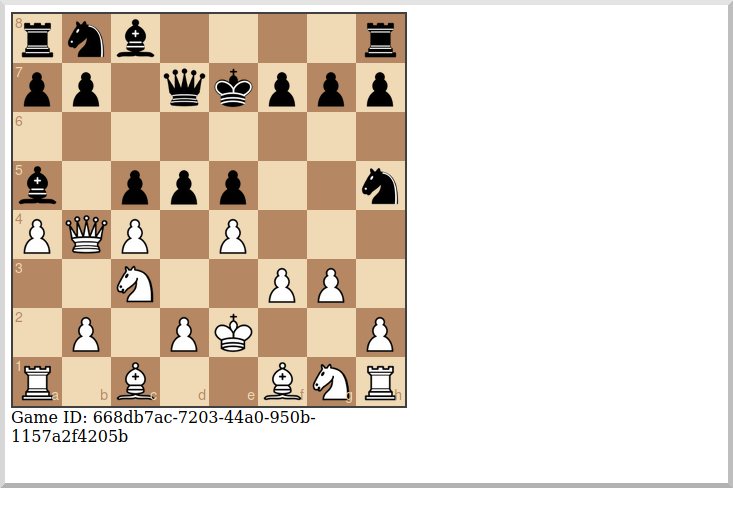
You can, for example, start a single game with a moderately large delay between plays:
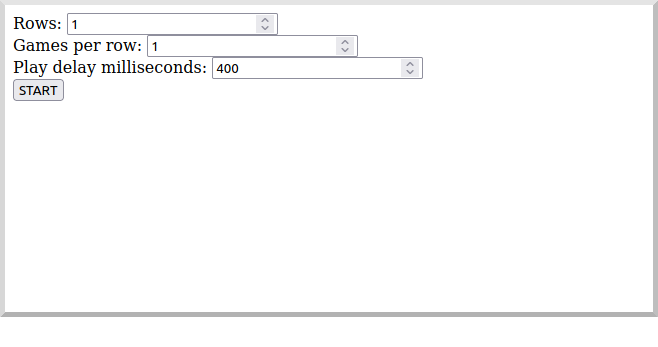
A single board is displayed:
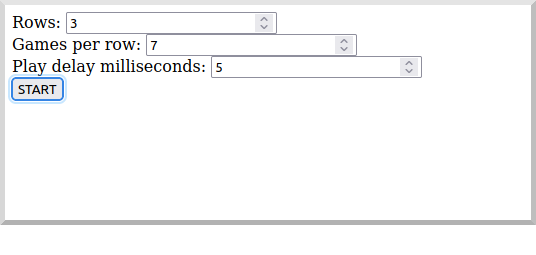
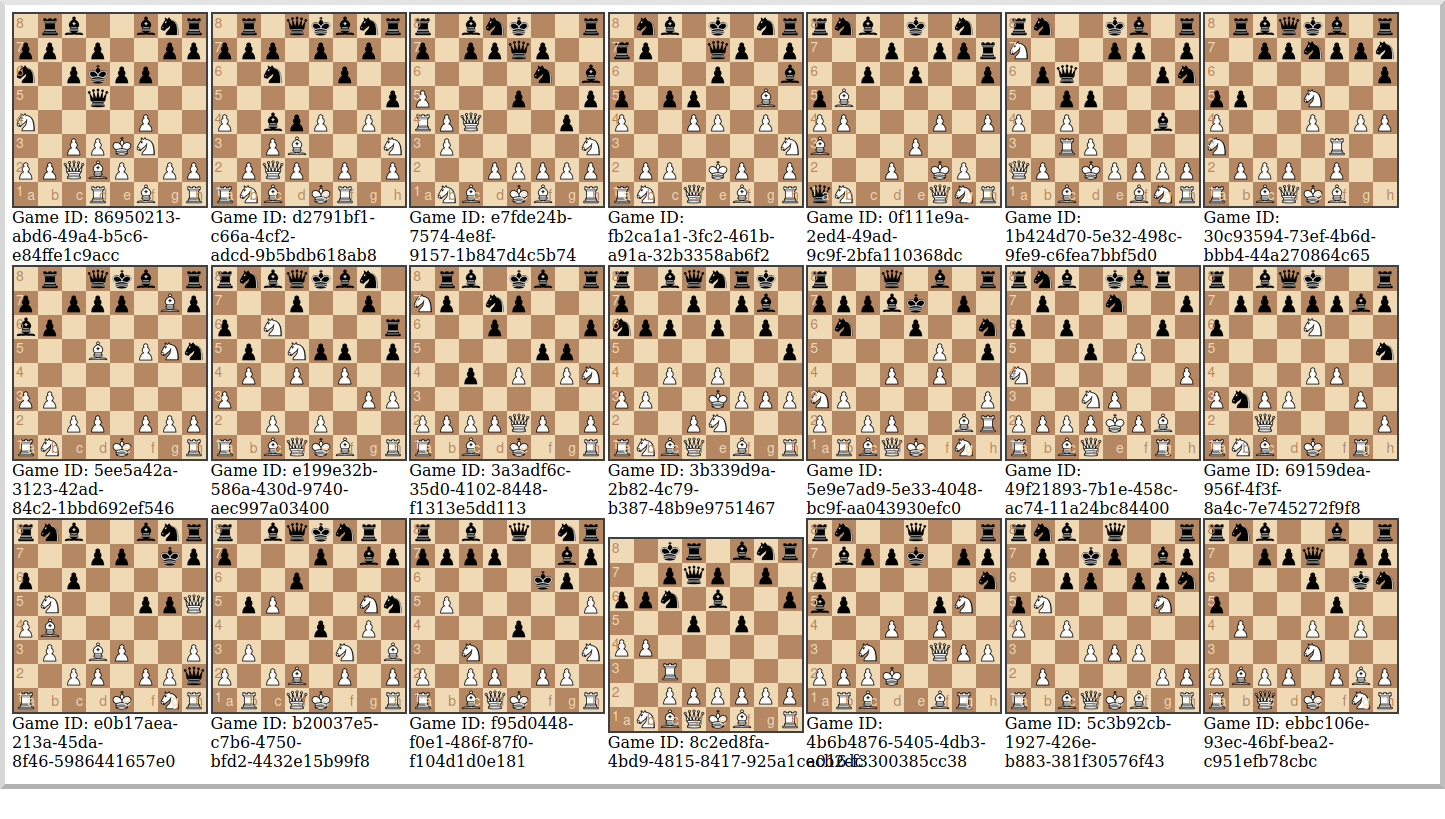
Or you can start multiple games with a short delay (or any combination you want):
Multiple simultaneous boards are displayed:
Moving to Oracle Cloud
Oracle Autonomous Database (ATP)
Update the chess-listener microservice to support Oracle in addition to the in-memory H2 database.
Dependencies
Add the micronaut-oraclecloud-atp dependency to the chess-listener microservice to support using ATP:
implementation("io.micronaut.oraclecloud:micronaut-oraclecloud-atp")Configuration
Create src/main/resources/application-oraclecloud.properties. The Micronaut framework applies this configuration file only for the oraclecloud environment.
Repositories
Create the OracleGameRepository interface that extends GameRepository and specifies the ORACLE dialect in the oraclecloud environment:
Create the OracleGameStateRepository interface that extends GameStateRepository:
imports
package example.micronaut.chess.repository;

import io.micronaut.context.annotation.Primary;
import io.micronaut.context.annotation.Requires;
import io.micronaut.data.jdbc.annotation.JdbcRepository;

import static io.micronaut.context.env.Environment.ORACLE_CLOUD;
import static io.micronaut.context.env.Environment.TEST;
import static io.micronaut.data.model.query.builder.sql.Dialect.ORACLE;@Primary
@JdbcRepository(dialect = ORACLE)
@Requires(env = {ORACLE_CLOUD, TEST})
public interface OracleGameStateRepository extends GameStateRepository {
}Flyway
Create a database migration script to create the Oracle database tables:
CREATE TABLE game (
    id CHAR(36) PRIMARY KEY,
    black_name VARCHAR2(255) NOT NULL,
    white_name VARCHAR2(255) NOT NULL,
    date_created TIMESTAMP NOT NULL,
    date_updated TIMESTAMP NOT NULL,
    draw NUMBER(3) NOT NULL,
    winner CHAR(1)
);

CREATE TABLE game_state (
    id CHAR(36) PRIMARY KEY,
    game_id CHAR(36) NOT NULL,
    date_created TIMESTAMP NOT NULL,
    player CHAR(1) NOT NULL,
    fen VARCHAR2(100) NOT NULL,
    pgn CLOB NOT NULL,
    move VARCHAR2(10) NOT NULL,
    CONSTRAINT fk_game_state_game FOREIGN KEY (game_id) REFERENCES game(id)
);
Oracle Cloud Streaming
Up to now, we’ve been using a local Kafka, but let’s configure the equivalent infrastructure in OCI. This will involve minimal application changes thanks to the ability to send and receive Cloud Streaming messages using Kafka APIs, and Micronaut support for Kafka.
Stream Pool and Streams
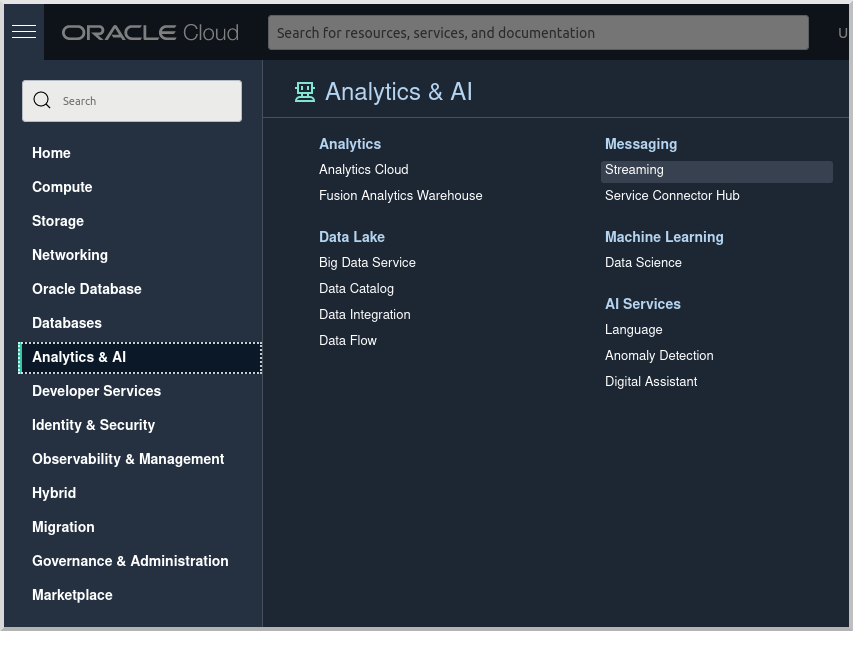
Log in to your Oracle Cloud tenancy and from the Oracle Cloud Menu, select "Analytics & AI" and then "Streaming":
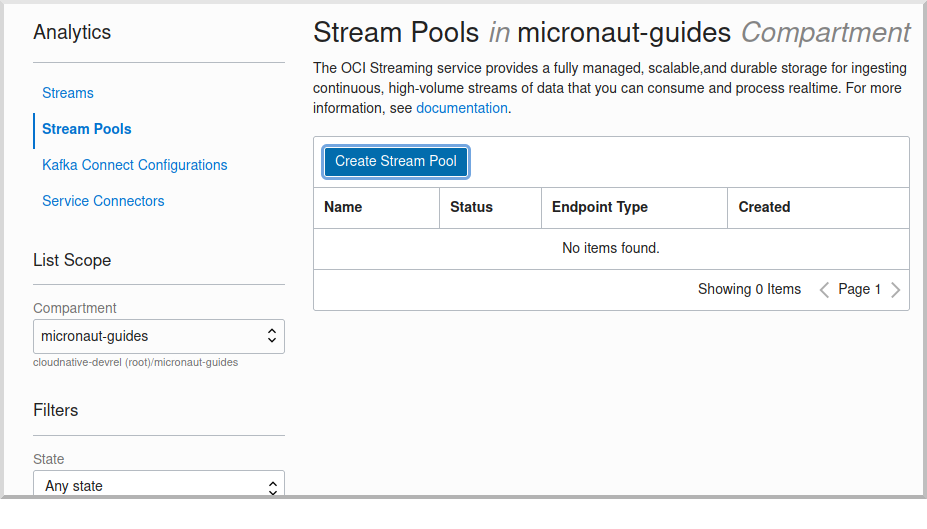
Choose the compartment to create the streams in, then click "Create Stream Pool":
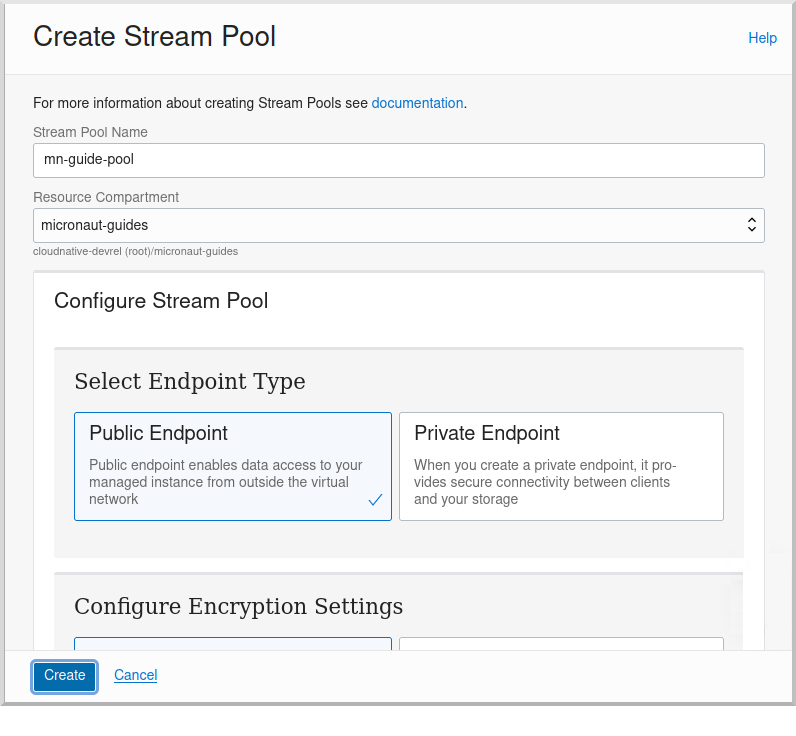
Enter a name for the pool, e.g., "mn-guide-pool", and click "Create":
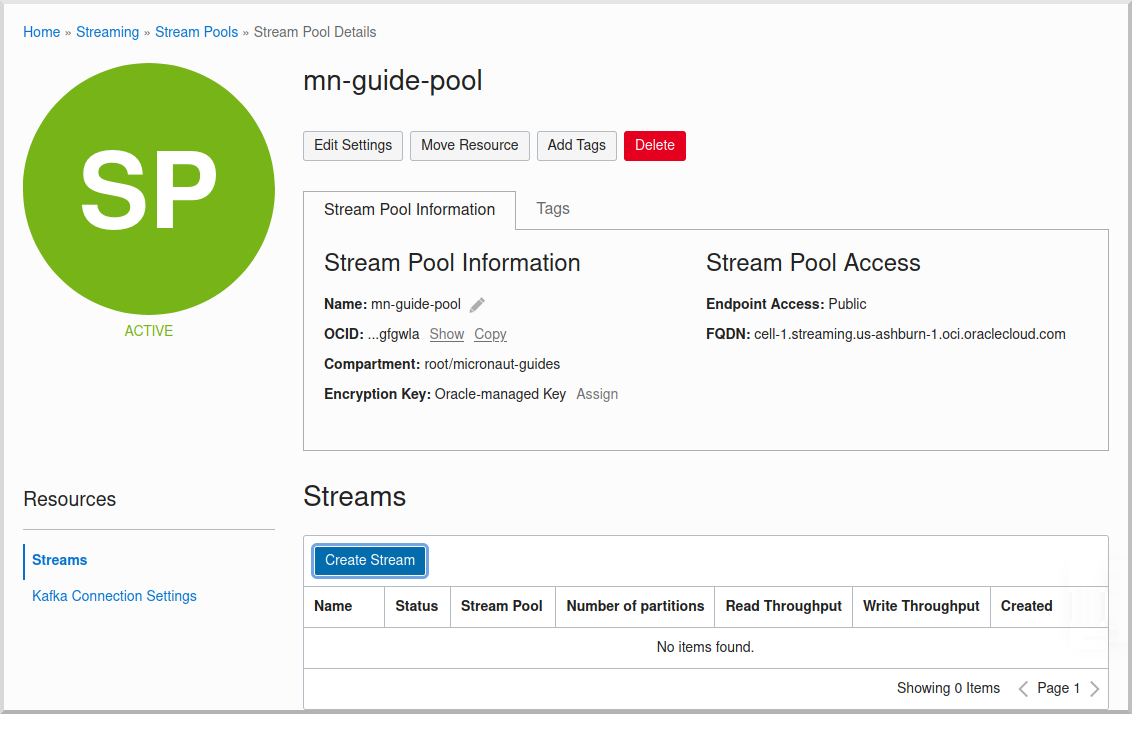
Click the "Copy" link in the OCID row and save the value for later. Also save the "FQDN" URL. Click "Create Stream":
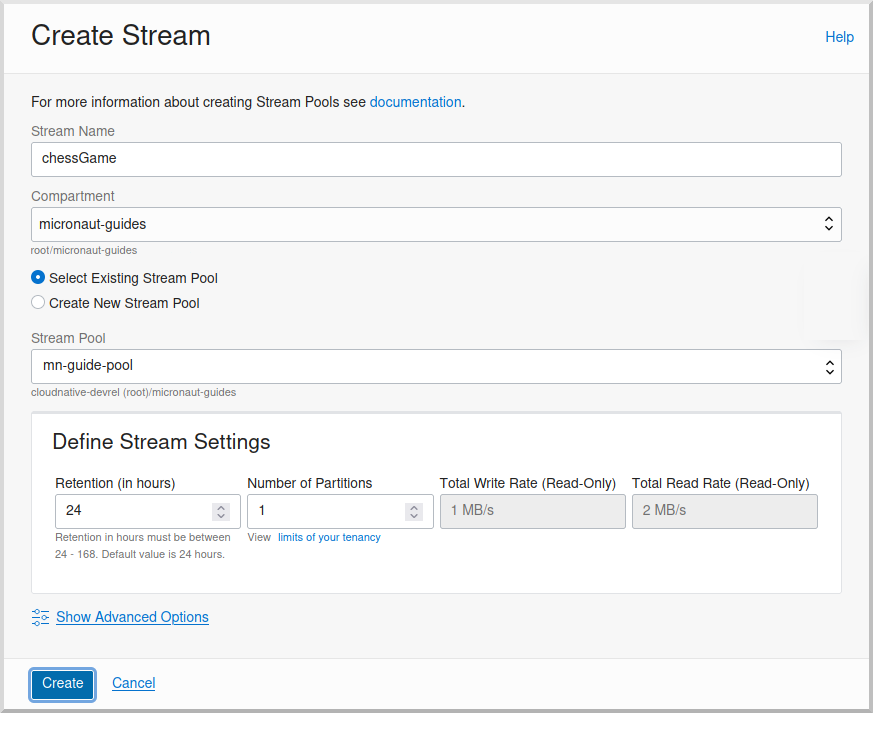
Create two streams within the pool you created with the Topic names used in the microservices. First create "chessGame":
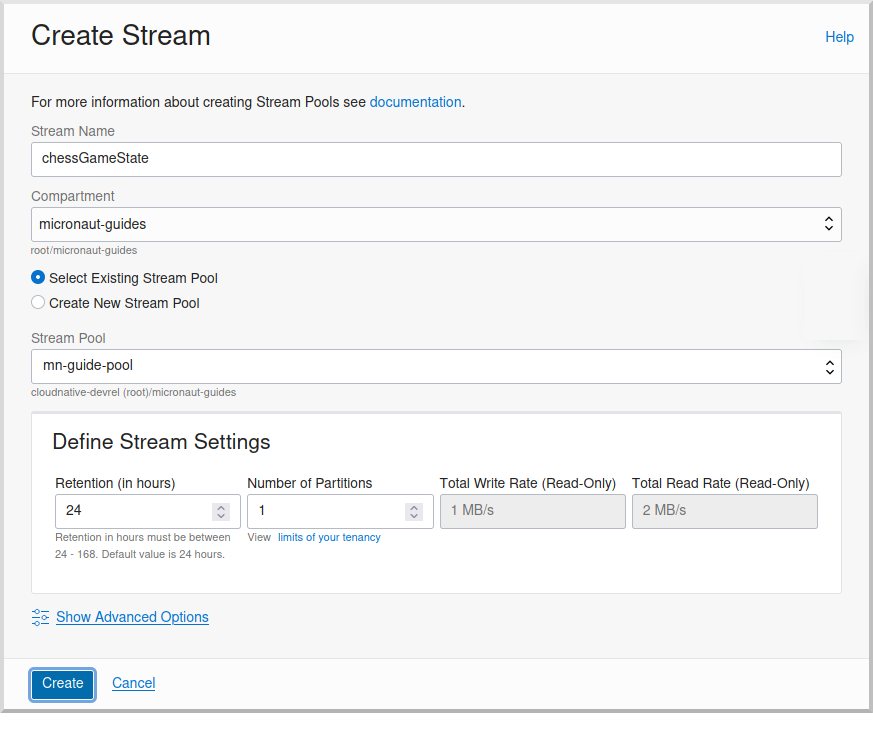
and then create "chessGameState":
User and Group
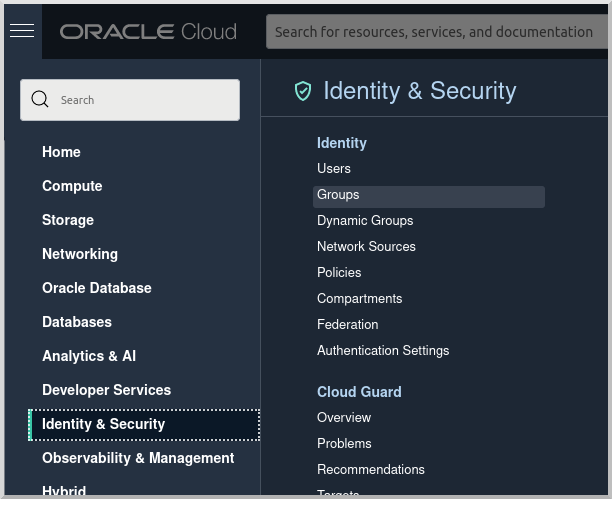
Create a group for the streams by clicking the Oracle Cloud menu and selecting "Identity & Security" and then click "Groups":
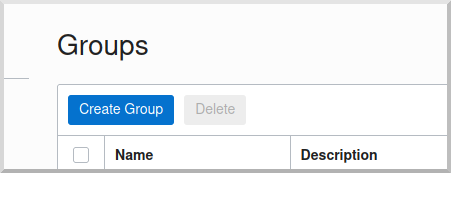
Click "Create Group":
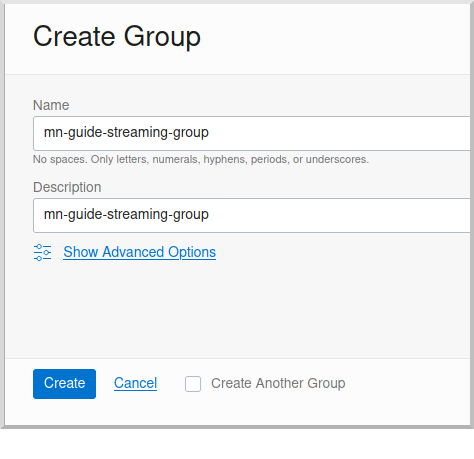
Choose a name and a description, e.g., "mn-guide-streaming-group", and click "Create":
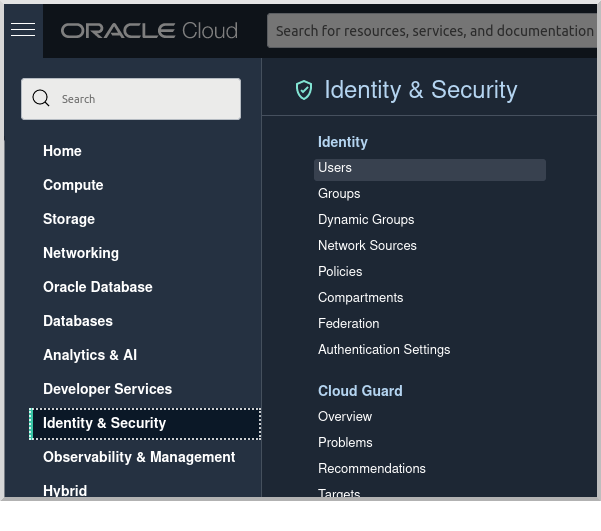
Create a user by clicking the Oracle Cloud menu and selecting "Identity & Security" and then click "Users":
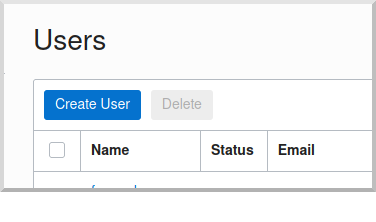
Click "Create User":
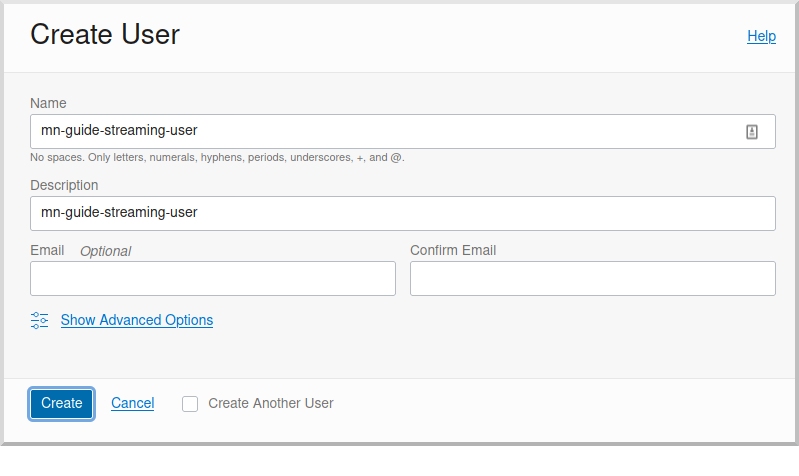
Choose a name and a description, e.g., "mn-guide-streaming-user", and click "Create":
Scroll down and click "Add User to Group":
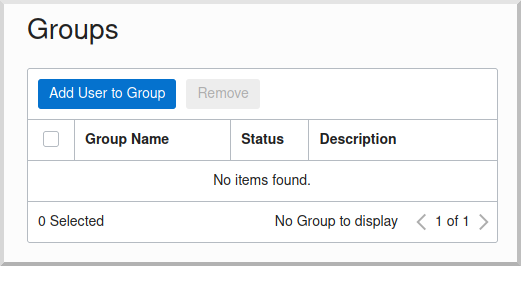
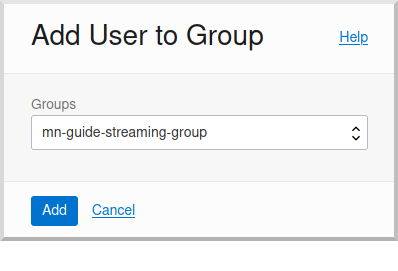
Select the group you created and click "Add":
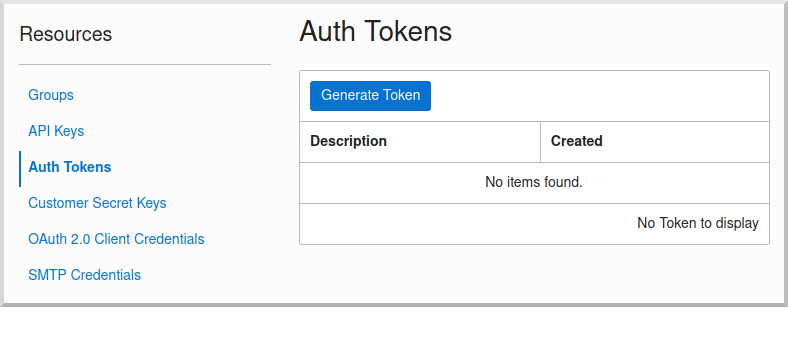
You’ll need an auth token to use as the password in the Micronaut Kafka configuration. Click "Auth Tokens" and then "Generate Token":
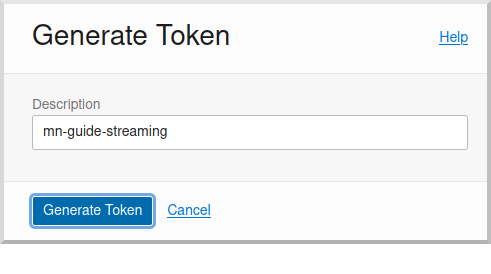
Enter a name for the token, e.g., "mn-guide-streaming", and click "Generate Token":
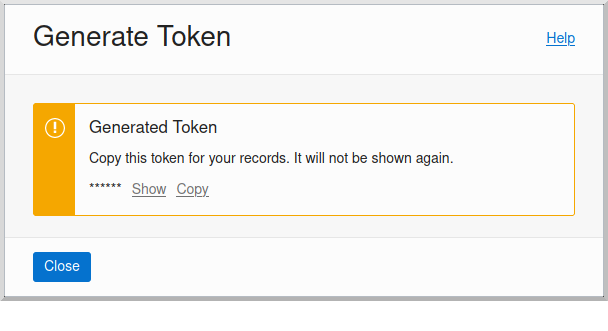
Copy the token to the clipboard and save it for later:
See the Groups and Users docs for more information.
Policy
Create a policy to grant various Streams access to the user and group you created.
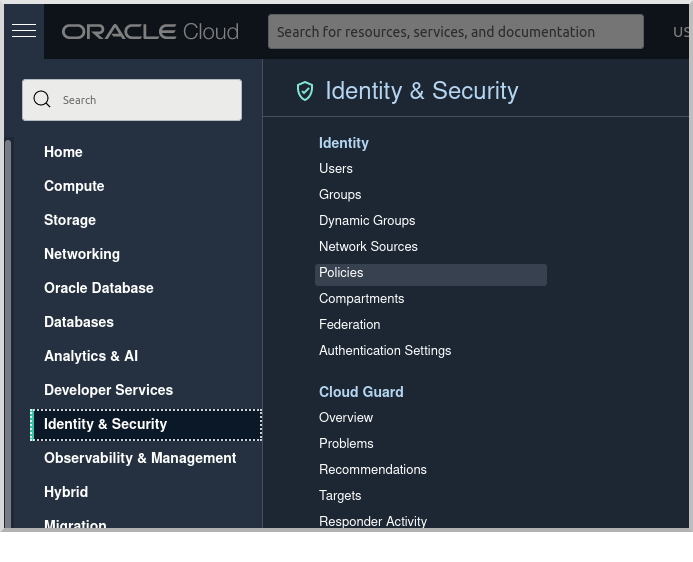
Open the Oracle Cloud Menu and click "Identity & Security" and then "Policies":
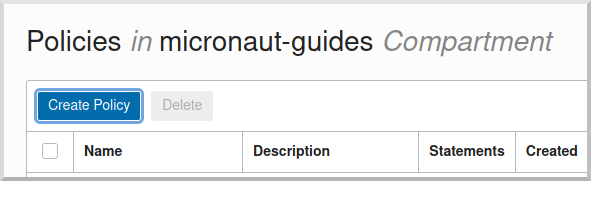
Select the compartment where you created the streams from the dropdown and click "Create Policy":
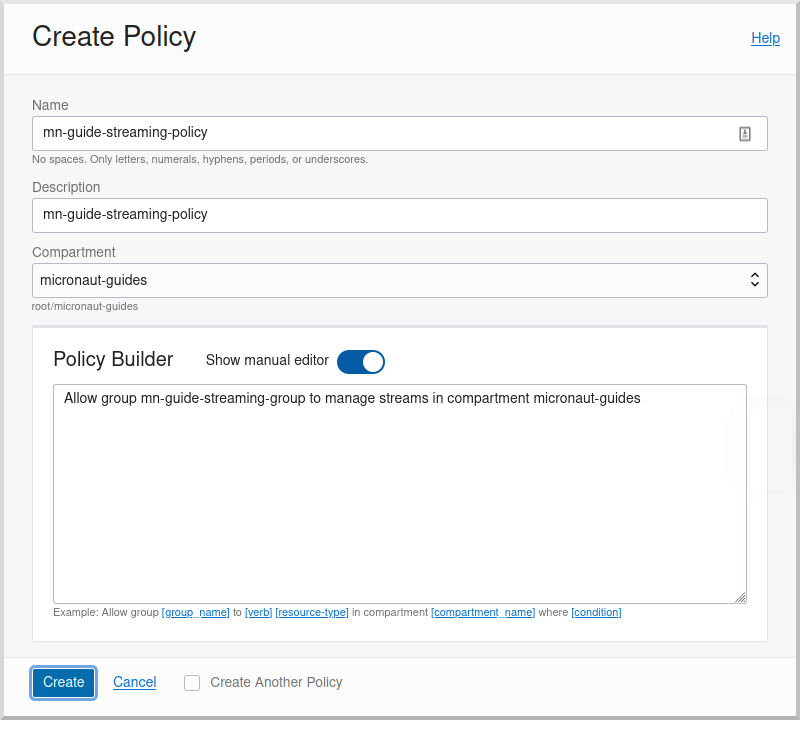
Choose a name and description, e.g., "mn-guide-streaming-policy", and click "Show Manual Editor". Copy the following and paste it into the "Policy Builder" field, replacing "micronaut-guides" with the name of the compartment you’re using, and click "Create":
Application configuration
Create src/main/resources/application-oraclecloud.properties in the chess-game microservice. Add the following there, and also add it to the application-oraclecloud.properties you already created in the chess-listener microservice:
Local Testing with Cloud Resources
You can now start both microservices in the oraclecloud environment to use Cloud Streaming and the ATP database you created:
To run each application use:
MICRONAUT_ENVIRONMENTS=oraclecloud ./gradlew runor if you use Windows:
cmd /C "set MICRONAUT_ENVIRONMENTS=oraclecloud && gradlew run"Writing Tests
We’ll run Kafka inside a Docker container using Testcontainers for both application tests and also run Oracle database inside a Docker container for testing persistence in the chess-listener tests.
chess-game tests
Create a test in the chess-game microservice to verify that Kafka message processing works:
chess-listener tests
Create a test in the chess-listener microservice to verify that Kafka message processing and database persistence works:
Create application-test.properties file in src/test/resources with this content:
datasources.default.url=jdbc:tc:oracle:thin:@/xe
datasources.default.driverClassName=org.testcontainers.jdbc.ContainerDatabaseDriver
datasources.default.username=system
datasources.default.password=oracle

flyway.datasources.default.locations=classpath:db/migration/oracle
flyway.datasources.default.baseline-version=0
flyway.datasources.default.baseline-on-migrate=true
Running the tests
To run the tests:
./gradlew testThen open build/reports/tests/test/index.html in a browser to see the results.
Deploy to OCI
Once you’ve verified that the microservices work with the configured cloud resources, you can deploy the microservices to Compute instances and run everything in Oracle Cloud.
Instance Principal authentication
The current configuration in application-oraclecloud.properties works when running locally using OCI resources (ATP database and Cloud Streams) but won’t work when deploying the application because it doesn’t make sense to install the Oracle Cloud CLI in Compute instances. Instead, we’ll use Instance Principal authentication.
To use this, we need to update the config, create a dynamic group, and add policy statements granting permissions.
Dynamic Group
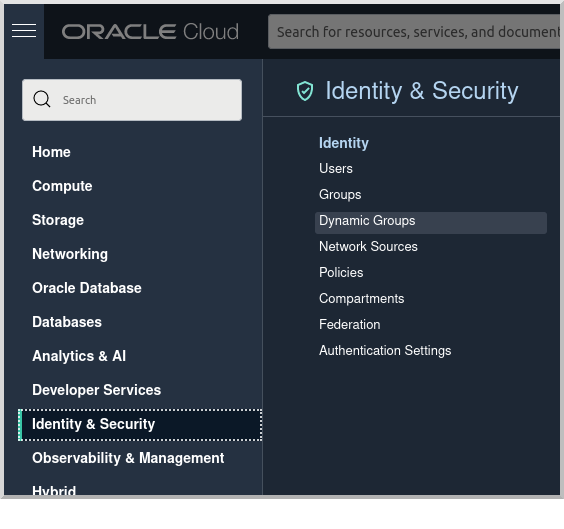
Create a Dynamic Group by clicking the Oracle Cloud menu and selecting "Identity & Security" and then click "Dynamic Groups":
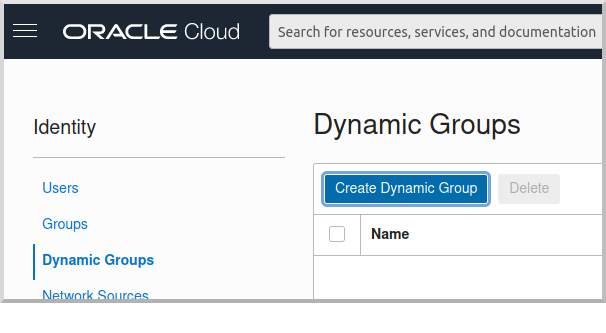
Click "Create Dynamic Group":
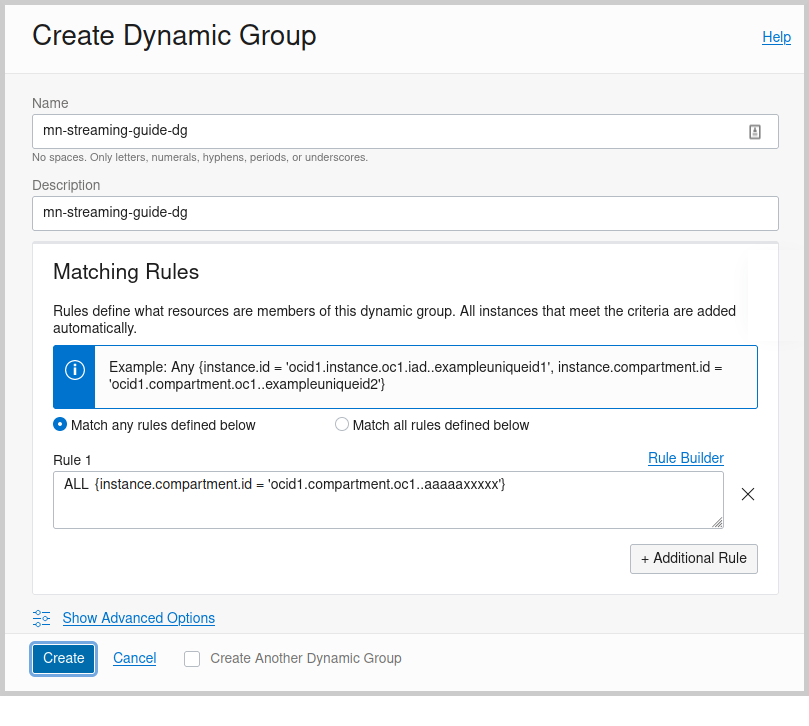
Then enter a name and description for the group, e.g., "mn-streaming-guide-dg", and a matching rule, i.e., the logic that will be used to determine group membership. We’ll make the rule fairly broad - enter ALL {instance.compartment.id = 'ocid1.compartment.oc1..aaaaaxxxxx'} replacing ocid1.compartment.oc1..aaaaaxxxxx with the compartment OCID where you’re creating your Compute instances and click "Create":
See the Dynamic Group docs for more information.
Dynamic Group Policy Statements
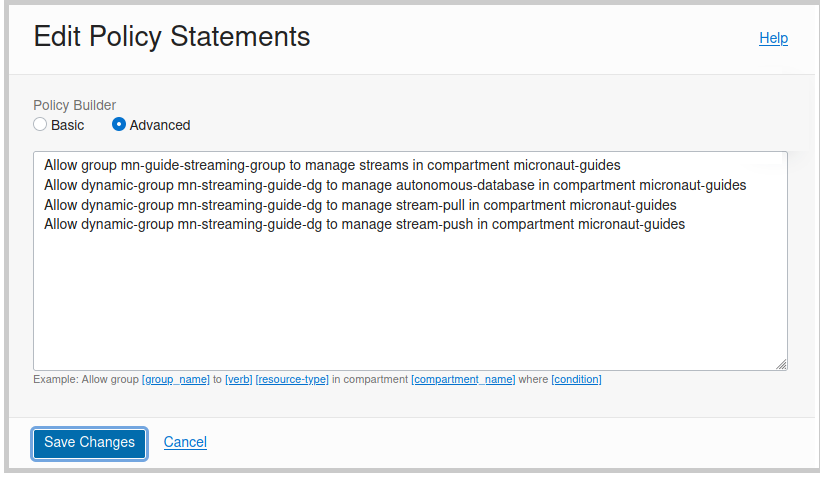
Edit the policy you created earlier and add three new policies: one to grant access to Autonomous Database, one to allow sending stream messages, and one to allow receiving stream messages:
Configuration
Edit application-oraclecloud.properties in the chess-listener microservice and replace
oci:
  config:
    profile: DEFAULT
with
oci:
  config:
    instance-principal:
      enabled: true
Generate Micronaut Application Native Executables with GraalVM
We will use GraalVM, an advanced JDK with ahead-of-time Native Image compilation, to generate a native executable of this Micronaut application.
Compiling Micronaut applications ahead of time with GraalVM significantly improves startup time and reduces the memory footprint of JVM-based applications.
|
Note
|
Only Java and Kotlin projects support using GraalVM’s native-image tool. Groovy relies heavily on reflection, which is only partially supported by GraalVM.
|
Native Executable Generation
sdk install java 25.4.4+1-graalFor installation on Windows, or for a manual installation on Linux or Mac, see the GraalVM Getting Started documentation.
The previous command installs Oracle GraalVM, which is free to use in production and free to redistribute, at no cost, under the GraalVM Free Terms and Conditions.
Alternatively, you can use the GraalVM Community Edition:
sdk install java 25.4.4.1+1-graalceTo generate native executables for each application using Gradle, run:
./gradlew nativeCompileThe native executables are created in build/native/nativeCompile directory and can be run with build/native/nativeCompile/micronautguide.
It is possible to customize the name of a native executable or pass additional parameters to GraalVM:
|
Note
|
Native executable building will fail if the H2 driver is in the classpath, so comment out that dependency in your build script before building. No other changes are needed since there are no compile dependencies on the library, so you can keep the H2 versions of the repository interfaces for use in dev mode. |
Deployable Native Executables
The native executables you built probably won’t be deployable to OCI even if you build on the same Linux distro your Compute instances use. To create deployable native executables, change the build process a bit.
To generate deployable native executables for each application using Gradle, run:
./gradlew dockerBuildNativeThen you just need to extract the native executable applications from the Docker images you built.
You’ll need the Docker image IDs, so run:
docker image lsThe output should look like this:
REPOSITORY                   TAG             IMAGE ID       CREATED          SIZE
chess-listener               latest          0e262e1754a7   32 seconds ago   246MB
chess-game                   latest          43f567f2fed6   39 minutes ago   86.1MB
confluentinc/cp-kafka        latest          ca0dbcd0244c   2 weeks ago      771MB
confluentinc/cp-zookeeper    latest          04999d93068f   2 weeks ago      771MB
ghcr.io/graalvm/graalvm-ce   java11-21.1.0   9762c6e631f0   2 months ago     1.29GB
ghcr.io/graalvm/graalvm-ce   java8-21.1.0    aef3649e379d   2 months ago     1.12GB
frolvlad/alpine-glibc        alpine-3.12     39c4d33bd807   2 months ago     17.9MB
portainer/portainer          latest          cd645f5a4769   13 months ago    79.1MB
The IDs should be at the top since they’re the most recent.
Then run this for each image, replacing image_id with the Docker image ID, e.g., 0e262e1754a7 and 43f567f2fed6:
docker create --name container_temp <image_id>
docker cp container_temp:/app/application .
docker rm container_temp
Now you can scp each native executable to a Compute instance with no Java installed and see the startup time and resource usage reduction you expect when running applications as native executables.
Next Steps
Read more about Kafka support in the Micronaut framework.
License
|
Note
|
All guides are released with an Apache License 2.0 for the code and a Creative Commons Attribution 4.0 license for the writing and media (images). |