mn create-app example.micronaut.micronautguide \
    --features=validation,security-jwt,security-ldap,data-jdbc,jdbc-hikari,h2,spring-security-crypto,reactor \
    --build=gradle \
    --lang=groovy \
    --test=spock
Note
If you don’t specify the --build argument, Gradle with the Kotlin DSL is used as the build tool. --lang argument, Java is used as the language.--test argument, JUnit is used for Java and Kotlin, and Spock is used for Groovy.
The previous command creates a Micronaut application with the default package example.micronaut in a directory named micronautguide.
If you use Micronaut Launch, select Micronaut Application as application type and add validation, security-jwt, security-ldap, data-jdbc, jdbc-hikari, h2, spring-security-crypto, and reactor features.
Note
If you have an existing Micronaut application and want to add the functionality described here, you can view the dependency and configuration changes from the specified features, and apply those changes to your application.
The previous command creates a Micronaut application with the default package example.micronaut in a directory named micronautguide.
Note
If you have an existing Micronaut application and want to add the functionality described here, you can view the dependency and configuration changes from the specified features, and apply those changes to your application.
The generated application.properties includes configuration settings that enable security:
src/main/resources/application.properties
micronaut.security.authentication =bearer # micronaut.security.token.jwt.signatures.secret.generator.secret =${JWT_GENERATOR_SIGNATURE_SECRET\:pleaseChangeThisSecretForANewOne}
Security LDAP
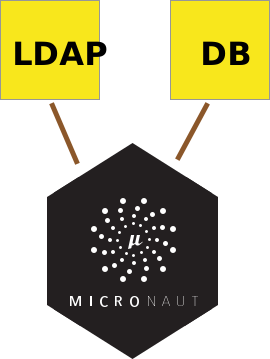
The Micronaut framework supports authentication with LDAP out of the box.
We will use the open Debian LDAP service for this guide.
Create the configuration properties matching those of the LDAP Server.
src/main/resources/application.properties
# micronaut.security.ldap.default.context.server =ldaps://db.debian.org micronaut.security.ldap.default.context.managerDn =cn=read-only-admin,dc=debian,dc=org micronaut.security.ldap.default.context.managerPassword =password micronaut.security.ldap.default.search.base =dc=debian,dc=org micronaut.security.ldap.default.groups.enabled =true micronaut.security.ldap.default.groups.base =dc=debian,dc=org
Micronaut Data JDBC
compileOnly("io.micronaut.data:micronaut-data-processor" )
implementation("io.micronaut.data:micronaut-data-jdbc" )
implementation("io.micronaut.sql:micronaut-jdbc-hikari" )
runtimeOnly("com.h2database:h2" )
And the database configuration:
src/main/resources/application.properties
datasources.default.password =datasources.default.dialect =H2datasources.default.schema-generate =CREATE_DROPdatasources.default.url =jdbc\:h2\:mem\:devDb;LOCK_TIMEOUT\=10000;DB_CLOSE_ON_EXIT\=FALSEdatasources.default.username =sadatasources.default.driver-class-name =org.h2.Driver
Entities
A domain class fulfills the M in the Model View Controller (MVC) pattern and represents a persistent entity that is
mapped onto an underlying database table.
User
Create a UserState interface to model the user state.
groovy/src/main/groovy/example/micronaut/UserState.groovy
imports package example.micronautinterface UserState { String getUsername () String getPassword () boolean isEnabled () boolean isAccountExpired () boolean isAccountLocked () boolean isPasswordExpired ()}
Create User domain class to store users within our application.
groovy/src/main/groovy/example/micronaut/domain/User.groovy
imports package example.micronaut.domainimport example.micronaut.UserStateimport io.micronaut.data.annotation.MappedEntityimport io.micronaut.serde.annotation.Serdeableimport jakarta.persistence.GeneratedValueimport jakarta.persistence.Idimport jakarta.validation.constraints.NotBlank@Serdeable // @MappedEntity // class User implements UserState { @Id // @GeneratedValue // Long id @NotBlank String email @NotBlank String username @NotBlank String password boolean enabled boolean accountExpired boolean accountLocked boolean passwordExpired }
Role
Create a Role domain class to store authorities within the application.
groovy/src/main/groovy/example/micronaut/domain/Role.groovy
imports package example.micronaut.domainimport io.micronaut.data.annotation.MappedEntityimport jakarta.persistence.GeneratedValueimport jakarta.persistence.Idimport jakarta.validation.constraints.NotBlankimport io.micronaut.serde.annotation.Serdeable@Serdeable // @MappedEntity // class Role { @Id // @GeneratedValue // Long id @NotBlank String authority }
UserRole
Create a UserRole which stores a many-to-many relationship between User and Role.
groovy/src/main/groovy/example/micronaut/domain/UserRole.groovy
imports package example.micronaut.domainimport io.micronaut.data.annotation.EmbeddedIdimport io.micronaut.data.annotation.MappedEntityimport io.micronaut.serde.annotation.Serdeable@Serdeable // @MappedEntity // class UserRole { @EmbeddedId // private UserRoleId userRoleId UserRole (UserRoleId userRoleId ) { this . userRoleId = userRoleId }
UserRoleId getUserRoleId () { return userRoleId }
} groovy/src/main/groovy/example/micronaut/domain/UserRoleId.groovy
imports package example.micronaut.domainimport groovy.transform.EqualsAndHashCodeimport io.micronaut.core.annotation.Creatorimport jakarta.persistence.Embeddableimport io.micronaut.serde.annotation.Serdeable@EqualsAndHashCode @Serdeable // @Embeddable // class UserRoleId { final Long userId final Long roleId @Creator // UserRoleId (Long userId , Long roleId ) { this . userId = userId this . roleId = roleId }
UserRoleId () { }
}
JDBC Repositories
Create the following JDBC repositories:
groovy/src/main/groovy/example/micronaut/UserJdbcRepository.groovy
imports package example.micronautimport example.micronaut.domain.Userimport io.micronaut.data.jdbc.annotation.JdbcRepositoryimport io.micronaut.data.model.query.builder.sql.Dialectimport io.micronaut.data.repository.CrudRepository@JdbcRepository (dialect = Dialect .H2 ) // interface UserJdbcRepository extends CrudRepository<User, Long> { // Optional<User> findByUsername (String username )} groovy/src/main/groovy/example/micronaut/RoleJdbcRepository.groovy
imports package example.micronautimport example.micronaut.domain.Roleimport io.micronaut.data.jdbc.annotation.JdbcRepositoryimport io.micronaut.data.model.query.builder.sql.Dialectimport io.micronaut.data.repository.CrudRepository@JdbcRepository (dialect = Dialect .H2 ) // interface RoleJdbcRepository extends CrudRepository<Role, Long> { // Role save (String authority ) Optional<Role> findByAuthority (String authority )} groovy/src/main/groovy/example/micronaut/UserRoleJdbcRepository.groovy
imports package example.micronautimport example.micronaut.domain.UserRoleimport example.micronaut.domain.UserRoleIdimport io.micronaut.data.annotation.Queryimport io.micronaut.data.jdbc.annotation.JdbcRepositoryimport io.micronaut.data.model.query.builder.sql.Dialectimport io.micronaut.data.repository.CrudRepository@JdbcRepository (dialect = Dialect .H2 ) // interface UserRoleJdbcRepository extends CrudRepository<UserRole, UserRoleId> { // @Query ("""SELECT role_.`authority` FROM `role` role_ inner join `user_role` user_role_ ON user_role_.`role_id` = role_.`id` inner join `user` user_ ON user_role_.`user_id` = user_.`id` where user_.`username` = :username""" ) // List<String> findAllAuthoritiesByUsername (String username )}
Password Encoder
Create an interface to handle password encoding:
groovy/src/main/groovy/example/micronaut/PasswordEncoder.groovy
imports package example.micronautimport io.micronaut.core.annotation.NonNullimport jakarta.validation.constraints.NotBlankinterface PasswordEncoder { String encode (@NotBlank @NonNull String rawPassword ) boolean matches (@NotBlank @NonNull String rawPassword , @NotBlank @NonNull String encodedPassword )} implementation("org.springframework.security:spring-security-crypto:@spring-security-cryptoVersion@" )
implementation("org.slf4j:jcl-over-slf4j" )
Then, write the implementation:
groovy/src/main/groovy/example/micronaut/BCryptPasswordEncoderService.groovy
imports package example.micronautimport groovy.transform.CompileStaticimport io.micronaut.core.annotation.NonNullimport org.springframework.security.crypto.bcrypt.BCryptPasswordEncoderimport org.springframework.security.crypto.password.PasswordEncoder as SpringSecurityPasswordEncoderimport jakarta.inject.Singletonimport jakarta.validation.constraints.NotBlank@CompileStatic @Singleton // class BCryptPasswordEncoderService implements PasswordEncoder { SpringSecurityPasswordEncoder delegate = new BCryptPasswordEncoder () String encode (@NotBlank @NonNull String rawPassword ) { delegate. encode(rawPassword)
}
@Override boolean matches (@NotBlank @NonNull String rawPassword , @NotBlank @NonNull String encodedPassword ) { delegate. matches(rawPassword, encodedPassword)
}
}
Register Service
We will register a user when the application starts up.
groovy/src/main/groovy/example/micronaut/RegisterService.groovy
imports package example.micronautimport example.micronaut.domain.Roleimport example.micronaut.domain.Userimport example.micronaut.domain.UserRoleimport example.micronaut.domain.UserRoleIdimport groovy.transform.CompileStaticimport jakarta.inject.Singletonimport jakarta.transaction.Transactionalimport jakarta.validation.constraints.Emailimport jakarta.validation.constraints.NotBlank@CompileStatic @Singleton class RegisterService { private final RoleJdbcRepository roleGormService private final UserJdbcRepository userGormService private final UserRoleJdbcRepository userRoleGormService private final PasswordEncoder passwordEncoder RegisterService (RoleJdbcRepository roleGormService , UserJdbcRepository userGormService , PasswordEncoder passwordEncoder , UserRoleJdbcRepository userRoleGormService ) { this . roleGormService = roleGormService this . userGormService = userGormService this . userRoleGormService = userRoleGormService this . passwordEncoder = passwordEncoder }
@Transactional void register (@Email String email , @NotBlank String username , @NotBlank String rawPassword , List<String> authorities ) { User user = userGormService. findByUsername(username). orElse(null ) if (! user) { final String encodedPassword = passwordEncoder. encode(rawPassword) user = userGormService. save(new User (email : email, username : username, password : encodedPassword, enabled : true , accountExpired : false , accountLocked : false , passwordExpired : false ))
}
if (user && authorities) { for (String authority : authorities) { Role role = roleGormService. findByAuthority(authority). orElseGet(() -> roleGormService. save(authority)) UserRoleId userRoleId = new UserRoleId (user. id, role. id) if (userRoleGormService. findById(userRoleId). isEmpty()) { userRoleGormService. save(new UserRole (userRoleId))
}
}
}
}
}
Update the Application class to be an event listener, and use RegisterService to create a user:
groovy/src/main/groovy/example/micronaut/Application.groovy
imports package example.micronautimport groovy.transform.CompileStaticimport io.micronaut.context.event.ApplicationEventListenerimport io.micronaut.runtime.Micronautimport io.micronaut.runtime.server.event.ServerStartupEventimport jakarta.inject.Singleton@CompileStatic @Singleton class Application implements ApplicationEventListener<ServerStartupEvent> { // private final RegisterService registerService Application (RegisterService registerService ) { // this . registerService = registerService }
@Override void onApplicationEvent (ServerStartupEvent event ) { // registerService. register('sherlock@micronaut.example' , 'sherlock' , 'elementary' , ['ROLE_DETECTIVE' ]) //
}
static void main (String [] args ) { Micronaut. run Application , args }
}
Delegating Authentication Provider
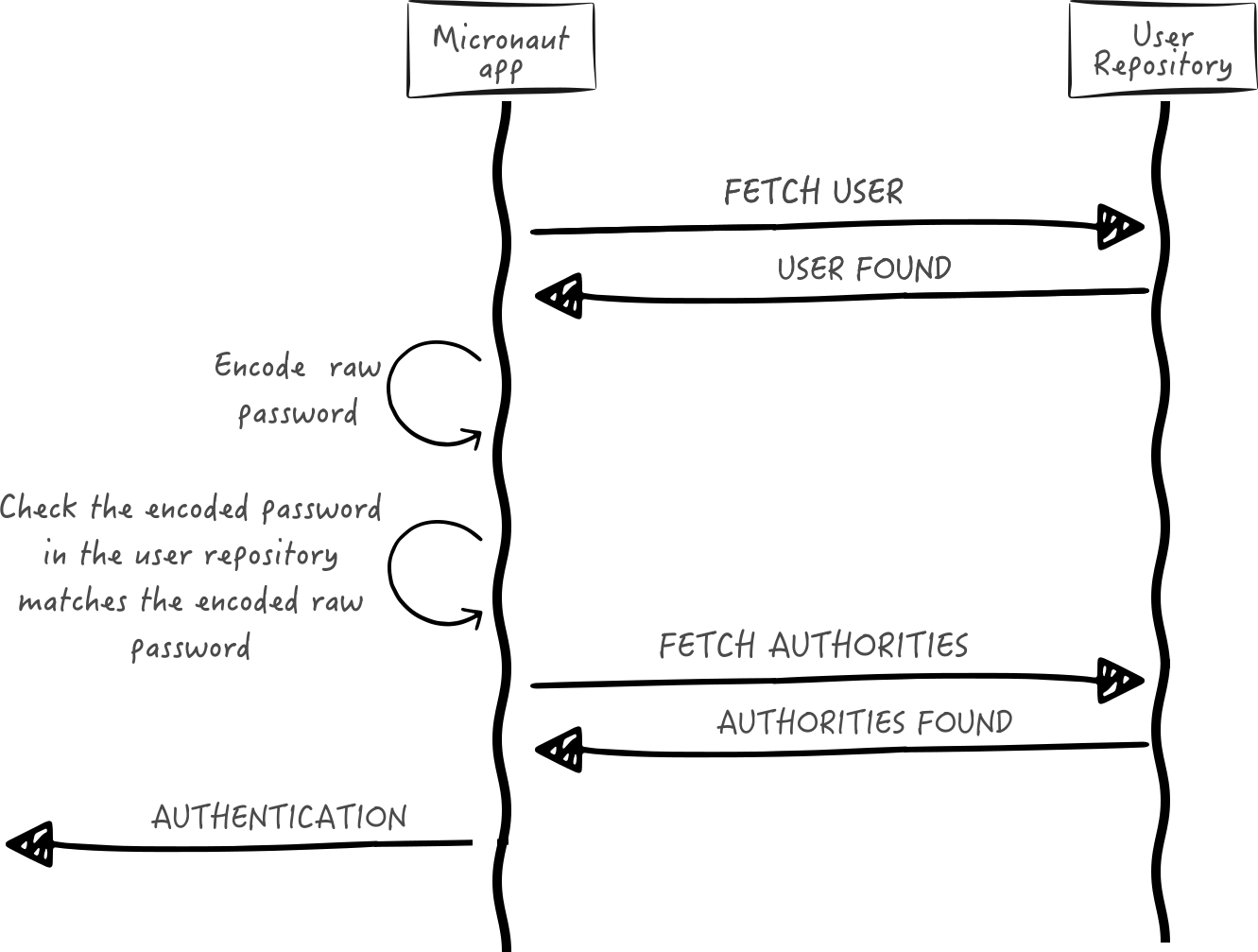
Next, we create interfaces and implementations for each of the pieces of the previous diagram.
User Fetcher
Create an interface to retrieve a UserState given a username.
groovy/src/main/groovy/example/micronaut/UserFetcher.groovy
imports package example.micronautimport io.micronaut.core.annotation.NonNullimport jakarta.validation.constraints.NotBlankinterface UserFetcher { Optional<UserState> findByUsername (@NotBlank @NonNull String username )}
Provide an implementation:
groovy/src/main/groovy/example/micronaut/UserFetcherService.groovy
imports package example.micronautimport io.micronaut.core.annotation.NonNullimport groovy.transform.CompileStaticimport jakarta.inject.Singletonimport jakarta.validation.constraints.NotBlank@CompileStatic @Singleton // class UserFetcherService implements UserFetcher { private final UserJdbcRepository userGormService UserFetcherService (UserJdbcRepository userGormService ) { // this . userGormService = userGormService }
@Override Optional<UserState> findByUsername (@NotBlank @NonNull String username ) { userGormService. findByUsername(username). map(it -> it as UserState )
}
}
Authorities Fetcher
Create an interface to retrieve roles given a username.
groovy/src/main/groovy/example/micronaut/AuthoritiesFetcher.groovy
imports package example.micronautinterface AuthoritiesFetcher { List<String> findAuthoritiesByUsername (String username )}
Provide an implementation:
groovy/src/main/groovy/example/micronaut/AuthoritiesFetcherService.groovy
imports package example.micronautimport jakarta.inject.Singletonimport groovy.transform.CompileStatic@CompileStatic @Singleton // class AuthoritiesFetcherService implements AuthoritiesFetcher { private final UserRoleJdbcRepository userRoleGormService AuthoritiesFetcherService (UserRoleJdbcRepository userRoleGormService ) { // this . userRoleGormService = userRoleGormService }
@Override List<String> findAuthoritiesByUsername (String username ) { userRoleGormService. findAllAuthoritiesByUsername(username)
}
}
Authentication Provider
Create an authentication provider which uses the interfaces you wrote in the previous sections.
groovy/src/main/groovy/example/micronaut/DelegatingAuthenticationProvider.groovy
imports package example.micronautimport io.micronaut.core.annotation.Nullableimport io.micronaut.core.annotation.NonNullimport io.micronaut.http.HttpRequestimport io.micronaut.scheduling.TaskExecutorsimport io.micronaut.security.authentication.AuthenticationExceptionimport io.micronaut.security.authentication.AuthenticationFailedimport io.micronaut.security.authentication.AuthenticationRequestimport io.micronaut.security.authentication.AuthenticationResponseimport io.micronaut.security.authentication.provider.HttpRequestReactiveAuthenticationProviderimport reactor.core.publisher.FluxSinkimport reactor.core.publisher.Fluximport reactor.core.scheduler.Schedulerimport reactor.core.scheduler.Schedulersimport org.reactivestreams.Publisherimport jakarta.inject.Namedimport jakarta.inject.Singletonimport java.util.concurrent.ExecutorServiceimport static io.micronaut.security.authentication.AuthenticationFailureReason.ACCOUNT_EXPIREDimport static io.micronaut.security.authentication.AuthenticationFailureReason.ACCOUNT_LOCKEDimport static io.micronaut.security.authentication.AuthenticationFailureReason.CREDENTIALS_DO_NOT_MATCHimport static io.micronaut.security.authentication.AuthenticationFailureReason.PASSWORD_EXPIREDimport static io.micronaut.security.authentication.AuthenticationFailureReason.USER_DISABLEDimport static io.micronaut.security.authentication.AuthenticationFailureReason.USER_NOT_FOUND@Singleton class DelegatingAuthenticationProvider <B> implements HttpRequestReactiveAuthenticationProvider<B> { private final UserFetcher userFetcher private final PasswordEncoder passwordEncoder private final AuthoritiesFetcher authoritiesFetcher private final Scheduler scheduler DelegatingAuthenticationProvider (UserFetcher userFetcher , PasswordEncoder passwordEncoder , AuthoritiesFetcher authoritiesFetcher , @Named (TaskExecutors .BLOCKING ) ExecutorService executorService ) { // this . userFetcher = userFetcher this . passwordEncoder = passwordEncoder this . authoritiesFetcher = authoritiesFetcher this . scheduler = Schedulers. fromExecutorService(executorService) }
@Override @NonNull Publisher<AuthenticationResponse> authenticate ( @Nullable HttpRequest<B> requestContext , @NonNull AuthenticationRequest<String, String> authenticationRequest ) {
Flux. create({ emitter -> UserState user = fetchUserState(authenticationRequest) AuthenticationFailed authenticationFailed = validate(user, authenticationRequest) if (authenticationFailed) { emitter. error(new AuthenticationException (authenticationFailed))
} else {
emitter. next(createSuccessfulAuthenticationResponse(user))
emitter. complete()
}
}, FluxSink.OverflowStrategy. ERROR )
.subscribeOn(scheduler) //
}
private AuthenticationFailed validate (UserState user , AuthenticationRequest authenticationRequest ) { AuthenticationFailed authenticationFailed = null if (! user) { authenticationFailed = new AuthenticationFailed (USER_NOT_FOUND )
} else if (! user. enabled) {
authenticationFailed = new AuthenticationFailed (USER_DISABLED )
} else if (user. accountExpired) {
authenticationFailed = new AuthenticationFailed (ACCOUNT_EXPIRED )
} else if (user. accountLocked) {
authenticationFailed = new AuthenticationFailed (ACCOUNT_LOCKED )
} else if (user. passwordExpired) {
authenticationFailed = new AuthenticationFailed (PASSWORD_EXPIRED )
} else if (! passwordEncoder. matches(authenticationRequest. secret. toString(), user. password)) {
authenticationFailed = new AuthenticationFailed (CREDENTIALS_DO_NOT_MATCH )
}
authenticationFailed
}
private UserState fetchUserState (AuthenticationRequest authRequest ) { final String username = authRequest. identity userFetcher. findByUsername(username). orElse(null )
}
private AuthenticationResponse createSuccessfulAuthenticationResponse (UserState user ) { List<String> authorities = authoritiesFetcher. findAuthoritiesByUsername(user. username) AuthenticationResponse. success(user. username, authorities) }
}
Important
It is critical that any blocking I/O operations (such as fetching the user from the database in the previous code sample) are offloaded to a separate thread pool that does not block the event loop.
LDAP Authentication Provider test
Create a test to verify an LDAP user can log in.
groovy/src/test/groovy/example/micronaut/LoginLdapSpec.groovy
imports package example.micronautimport io.micronaut.http.HttpRequestimport io.micronaut.http.HttpResponseimport io.micronaut.http.client.HttpClientimport io.micronaut.http.client.annotation.Clientimport io.micronaut.http.client.exceptions.HttpClientResponseExceptionimport io.micronaut.security.authentication.UsernamePasswordCredentialsimport io.micronaut.security.token.jwt.validator.ReactiveJsonWebTokenValidatorimport io.micronaut.security.token.render.AccessRefreshTokenimport io.micronaut.security.token.Claims;import io.micronaut.test.extensions.spock.annotation.MicronautTestimport reactor.core.publisher.Fluximport org.reactivestreams.Publisherimport spock.lang.Ignoreimport spock.lang.Sharedimport spock.lang.Specificationimport jakarta.inject.Injectimport static io.micronaut.http.HttpMethod.POSTimport static io.micronaut.http.MediaType.APPLICATION_JSON_TYPE@MicronautTest // class LoginLdapSpec extends Specification { @Inject @Client ('/' ) HttpClient client // @Shared @Inject ReactiveJsonWebTokenValidator tokenValidator // void '/login with valid credentials returns 200 and access token and refresh token' () { when : HttpRequest request = HttpRequest. create(POST , '/login' ) .accept(APPLICATION_JSON_TYPE )
.body(new UsernamePasswordCredentials ('sherlock' , 'elementary' )) //
HttpResponse<AccessRefreshToken> rsp = client. toBlocking(). exchange(request, AccessRefreshToken ) then : rsp. status. code == 200
rsp. body. present
rsp. body. get(). accessToken
}
@Ignore ('TODO fix the timeout issue' ) void '/login with invalid credentials returns UNAUTHORIZED' () { when : HttpRequest request = HttpRequest. create(POST , '/login' ) .accept(APPLICATION_JSON_TYPE )
.body(new UsernamePasswordCredentials ('euler' , 'bogus' )) //
client. toBlocking(). exchange(request)
then : HttpClientResponseException e = thrown() e. status. code == 401 //
}
void 'access token contains expiration date' () { when : HttpRequest request = HttpRequest. create(POST , '/login' ) .accept(APPLICATION_JSON_TYPE )
.body(new UsernamePasswordCredentials ('sherlock' , 'elementary' )) //
HttpResponse<AccessRefreshToken> rsp = client. toBlocking(). exchange(request, AccessRefreshToken ) then : rsp. status. code == 200
rsp. body. present
when : String accessToken = rsp. body. get(). accessToken then : accessToken
when : Publisher authentication = tokenValidator. validateToken(accessToken, request) // then : Flux. from(authentication). blockFirst() and : 'access token contains an expiration date' Flux. from(authentication). blockFirst(). attributes. get(Claims. EXPIRATION_TIME ) }
}
Login Testing
Test the /login endpoint. We verify both LDAP and database authentication providers work.
groovy/src/test/groovy/example/micronaut/LoginControllerSpec.groovy
imports package example.micronautimport io.micronaut.http.HttpRequestimport io.micronaut.http.HttpResponseimport io.micronaut.http.client.HttpClientimport io.micronaut.http.client.annotation.Clientimport io.micronaut.http.client.exceptions.HttpClientResponseExceptionimport io.micronaut.security.authentication.Authenticationimport io.micronaut.security.authentication.UsernamePasswordCredentialsimport io.micronaut.security.token.jwt.validator.ReactiveJsonWebTokenValidatorimport io.micronaut.security.token.render.AccessRefreshTokenimport io.micronaut.test.extensions.spock.annotation.MicronautTestimport reactor.core.publisher.Fluximport spock.lang.Sharedimport spock.lang.Specificationimport jakarta.inject.Injectimport static io.micronaut.http.HttpMethod.POSTimport static io.micronaut.http.MediaType.APPLICATION_JSON_TYPE@MicronautTest class LoginControllerSpec extends Specification { @Inject @Client ('/' ) HttpClient client @Shared @Inject ReactiveJsonWebTokenValidator tokenValidator @Inject UserJdbcRepository userGormService void 'attempt to access /login without supplying credentials server responds BAD REQUEST' () { when : HttpRequest request = HttpRequest. create(POST , '/login' ) .accept(APPLICATION_JSON_TYPE )
client. toBlocking(). exchange(request)
then : HttpClientResponseException e = thrown() e. status. code == 400
}
void '/login with valid credentials for a database user returns 200 and access token' () { expect : userGormService. count() > 0
when : HttpRequest request = HttpRequest. create(POST , '/login' ) .accept(APPLICATION_JSON_TYPE )
.body(new UsernamePasswordCredentials ('sherlock' , 'elementary' ))
HttpResponse<AccessRefreshToken> rsp = client. toBlocking(). exchange(request, AccessRefreshToken ) then : noExceptionThrown()
rsp. status. code == 200
rsp. body. present
rsp. body. get(). accessToken
when : String accessToken = rsp. body. get(). accessToken Authentication authentication = Flux. from(tokenValidator. validateToken(accessToken, request)). blockFirst() then : authentication. attributes
authentication. attributes. containsKey('roles' )
authentication. attributes. containsKey('iss' )
authentication. attributes. containsKey('exp' )
authentication. attributes. containsKey('iat' )
}
}