

Client Credentials Flow with Micronaut and Amazon Cognito
Learn how to use Client Credentials Flow between Micronaut microservices with an Authorization Server provided by Amazon Cognito.
On this guide
In this section
Getting Started
In this guide, we will create a Micronaut application written in Kotlin.
What you will need
To complete this guide, you will need the following:
-
Some time on your hands
-
A decent text editor or IDE (e.g. IntelliJ IDEA)
-
JDK 21 or greater installed with
JAVA_HOMEconfigured appropriately -
An Amazon Cognito account.
Solution
We recommend that you follow the instructions in the next sections and create the application step by step. However, you can go right to the completed example.
-
Download and unzip the source
Application Diagram
Download the complete solution of the guide. You will use the sample app as a starting point. The application contains three microservices:
-
bookcatalogue- Returns a list of books. It uses a domain consisting of a book name and an ISBN. -
bookinventory- Exposes an endpoint to check whether a book has sufficient stock to fulfill an order. It uses a domain consisting of a stock level and an ISBN. -
bookrecommendation- Consumes previous services and exposes an endpoint that recommends book names that are in stock.
The bookcatalogue service consumes endpoints exposed by the other services. The following image illustrates the original application flow:
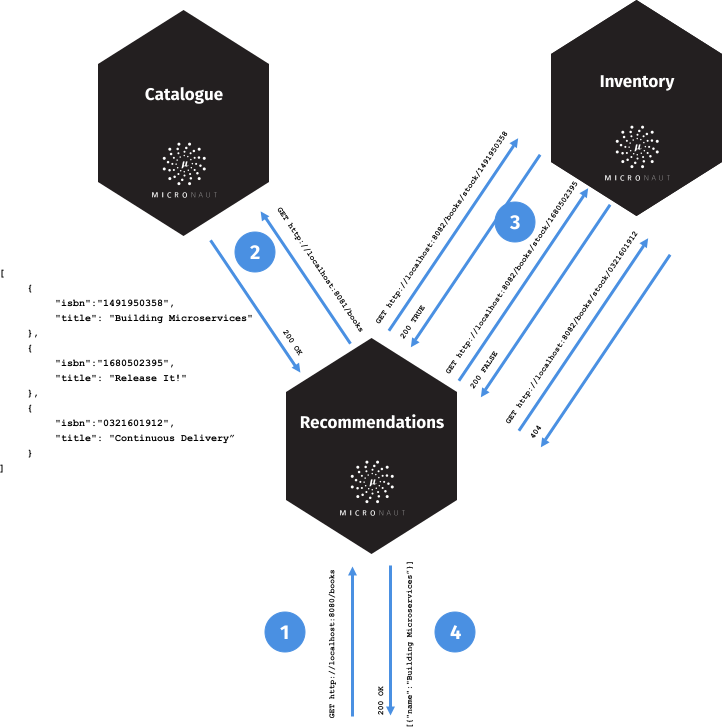
A request to bookrecommendation (http://localhost:8080/books) triggers several requests through our microservices mesh.
In this guide, you are going to secure the communication between the microservices. You will use a client credentials flow and obtain an access token from an Amazon Cognito authorization server.
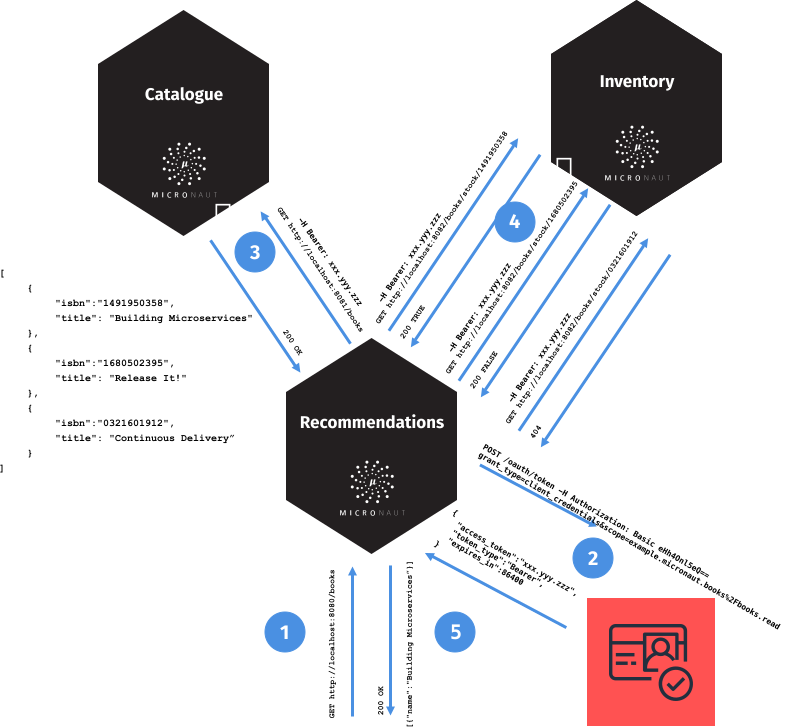
OAuth 2.0
To provide authentication, sign in to your AWS account and go to AWS Cognito.
With the Amazon Cognito SDK, you just write a few lines of code to enable your users to sign-up and sign-in to your mobile and web apps.
Standards-based authentication
Amazon Cognito uses common identity management standards including OpenID Connect, OAuth 2.0, and SAML 2.0.
First, create an Amazon Cognito User Pool:
Amazon Cognito User Pools - A directory for all your users
You can quickly create your own directory to sign up and sign in users, and to store user profiles using Amazon Cognito User Pools. User Pools provide a user interface you can customize to match your application. User Pools also enable easy integration with social identity providers such as Facebook, Google, and Amazon, and enterprise identity providers such as Microsoft Active Directory through SAML.

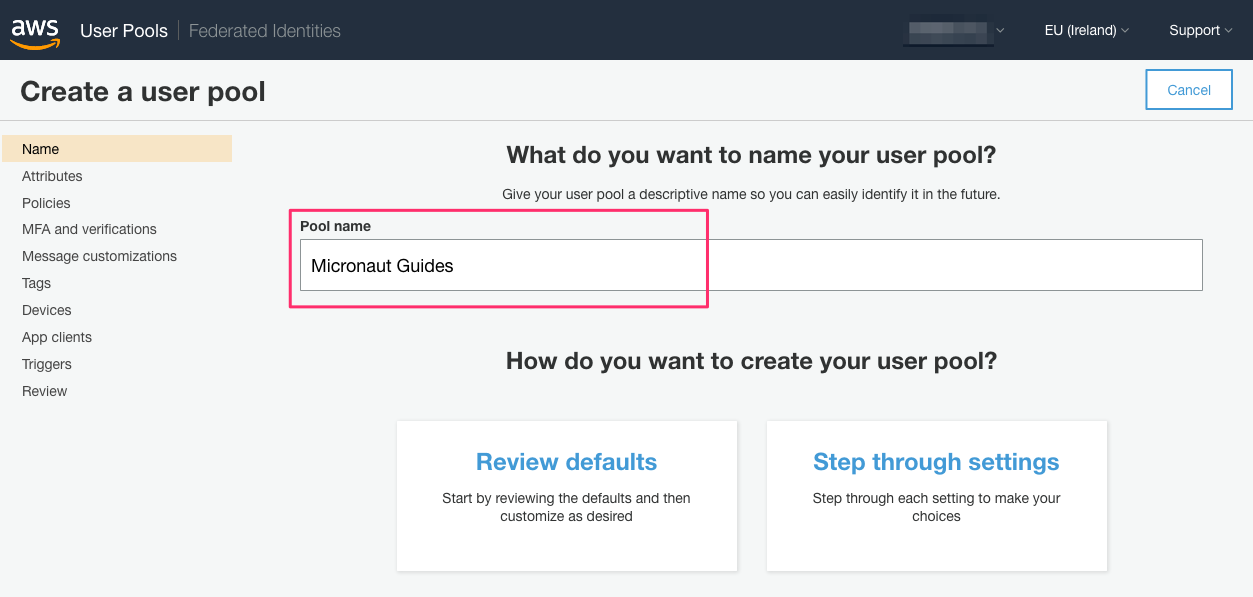
Amazon Cognito Pools are regional. Thus, annotate the region you are using.
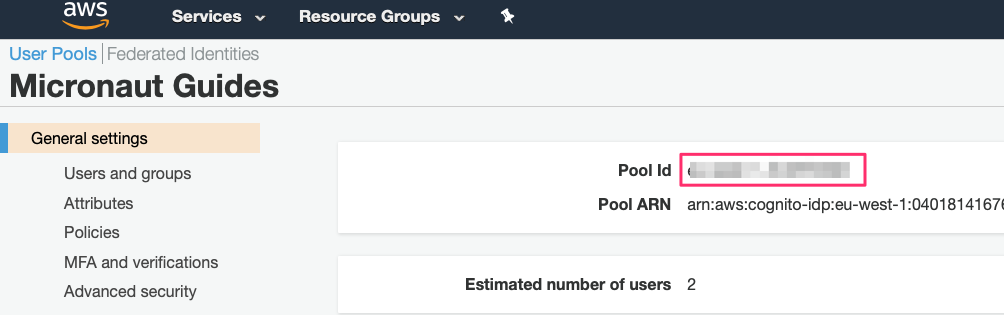
While you setup the Amazon Cognito User Pool, you will need to save the pool id:
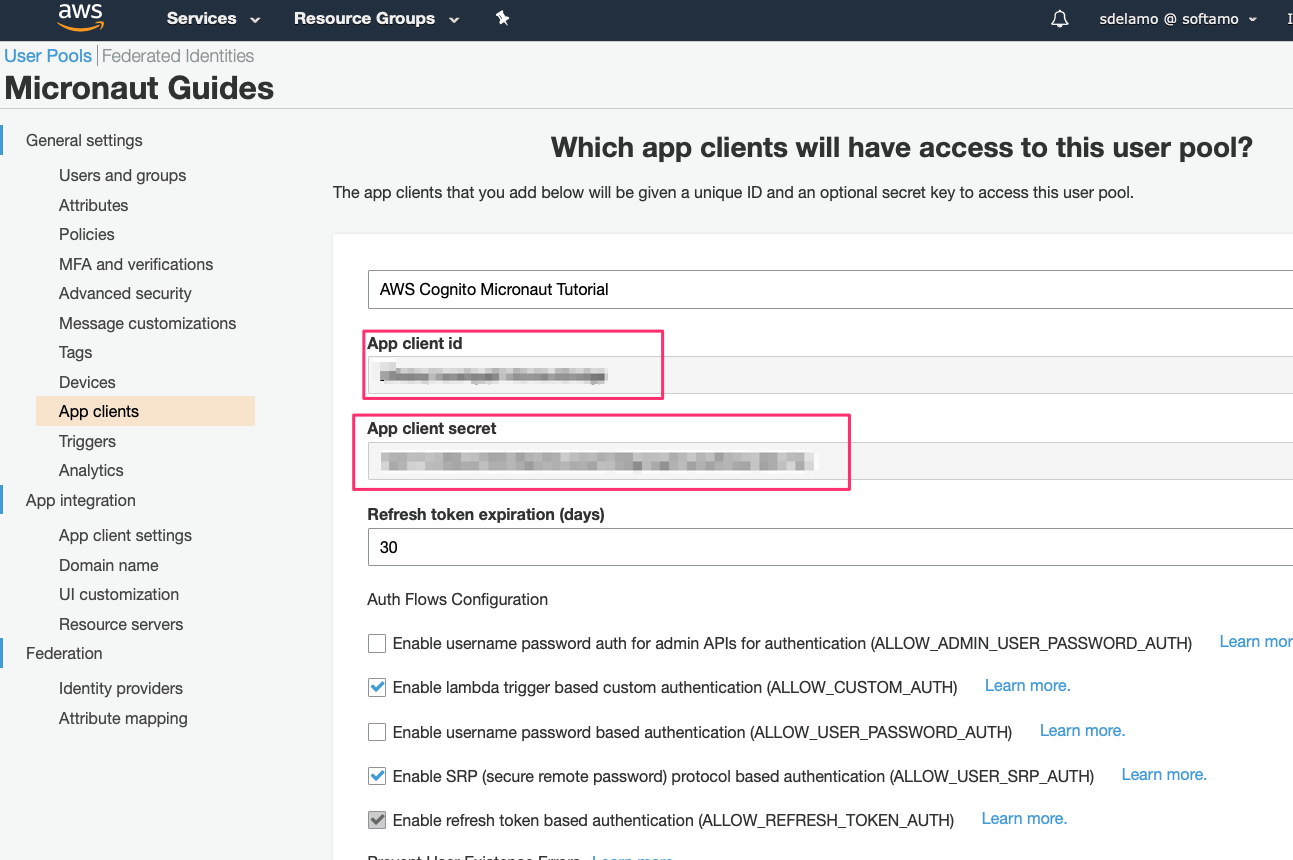
Save the client id and client secret:
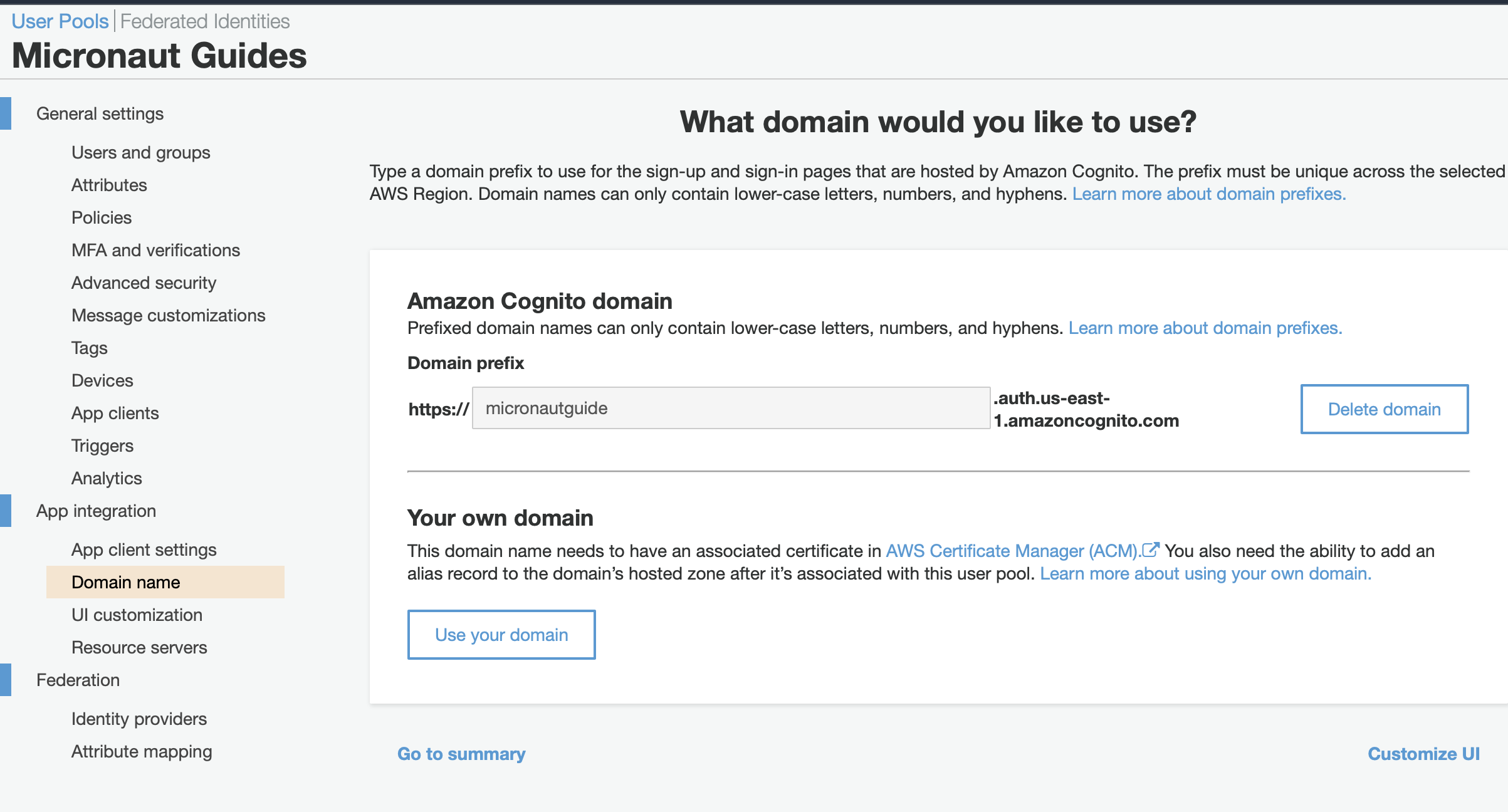
Add a domain
Using the AWS CLI
Some of the following commands use jq
jq is a lightweight and flexible command-line JSON processor
Alternatively, you can use the AWS CLI to create the user pool and client (change the region to your desired value):
export COGNITO_REGION=eu-west-1
export COGNITO_POOL_ID=$(aws cognito-idp create-user-pool --pool-name "Micronaut Guides" --username-attributes "email" --auto-verified-attributes "email" | jq -r '.UserPool.Id')
export OAUTH_CLIENT_ID=$(aws cognito-idp create-user-pool-client --generate-secret --user-pool-id $COGNITO_POOL_ID --client-name "AWS Cognito Micronaut Tutorial" --callback-urls "http://localhost:8080/oauth/callback/cognito" --logout-urls "http://localhost:8080/logout" --supported-identity-providers COGNITO --allowed-o-auth-flows "code" --allowed-o-auth-scopes "phone" "email" "openid" "profile" "aws.cognito.signin.user.admin" --allowed-o-auth-flows-user-pool-client | jq -r '.UserPoolClient.ClientId')
export OAUTH_CLIENT_SECRET=$(aws cognito-idp describe-user-pool-client --user-pool-id $COGNITO_POOL_ID --client-id $OAUTH_CLIENT_ID | jq -r '.UserPoolClient.ClientSecret')
export COGNITO_DOMAIN="micronaut-guides-$RANDOM"
aws cognito-idp create-user-pool-domain --domain $COGNITO_DOMAIN --user-pool-id $COGNITO_POOL_ID
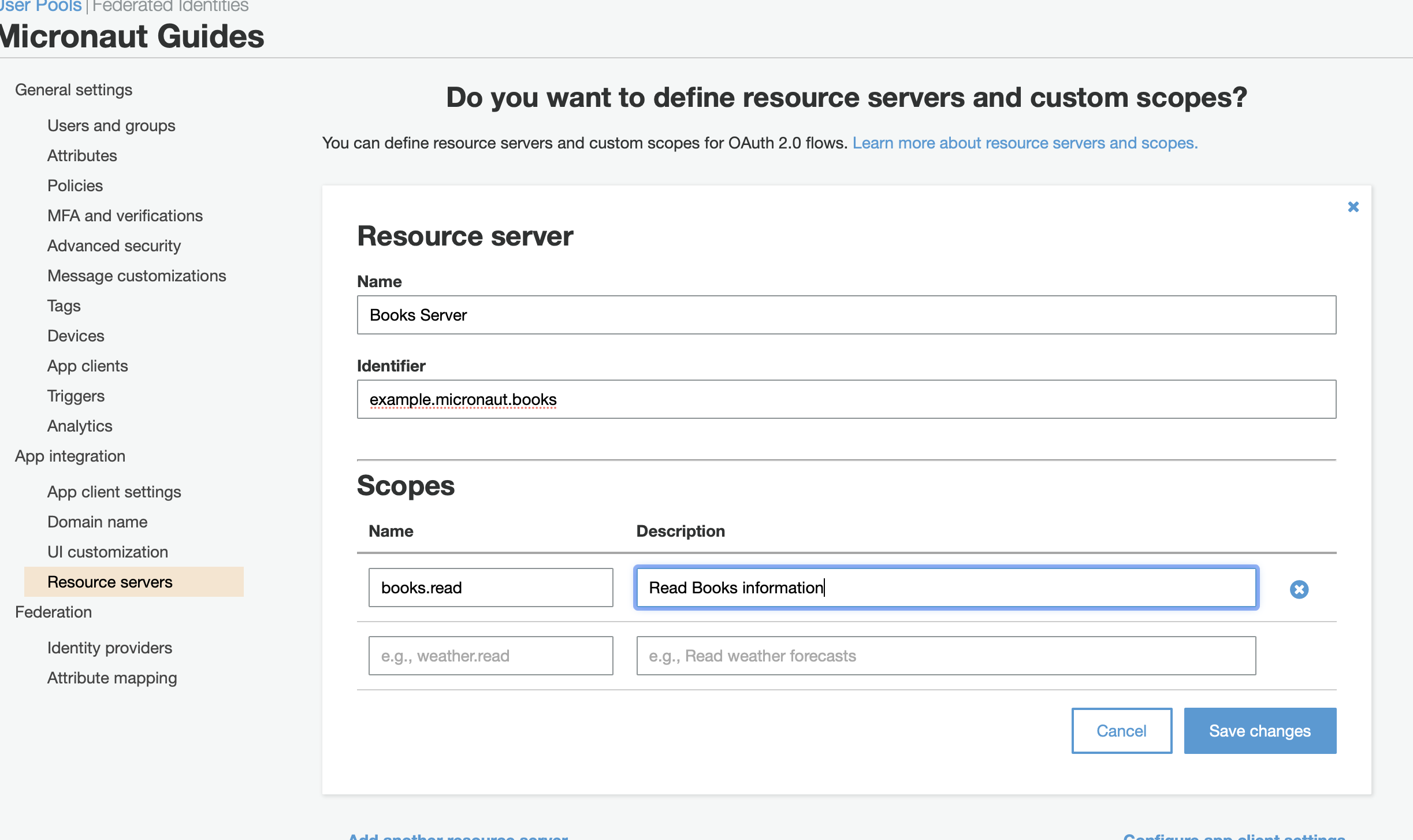
Resource server
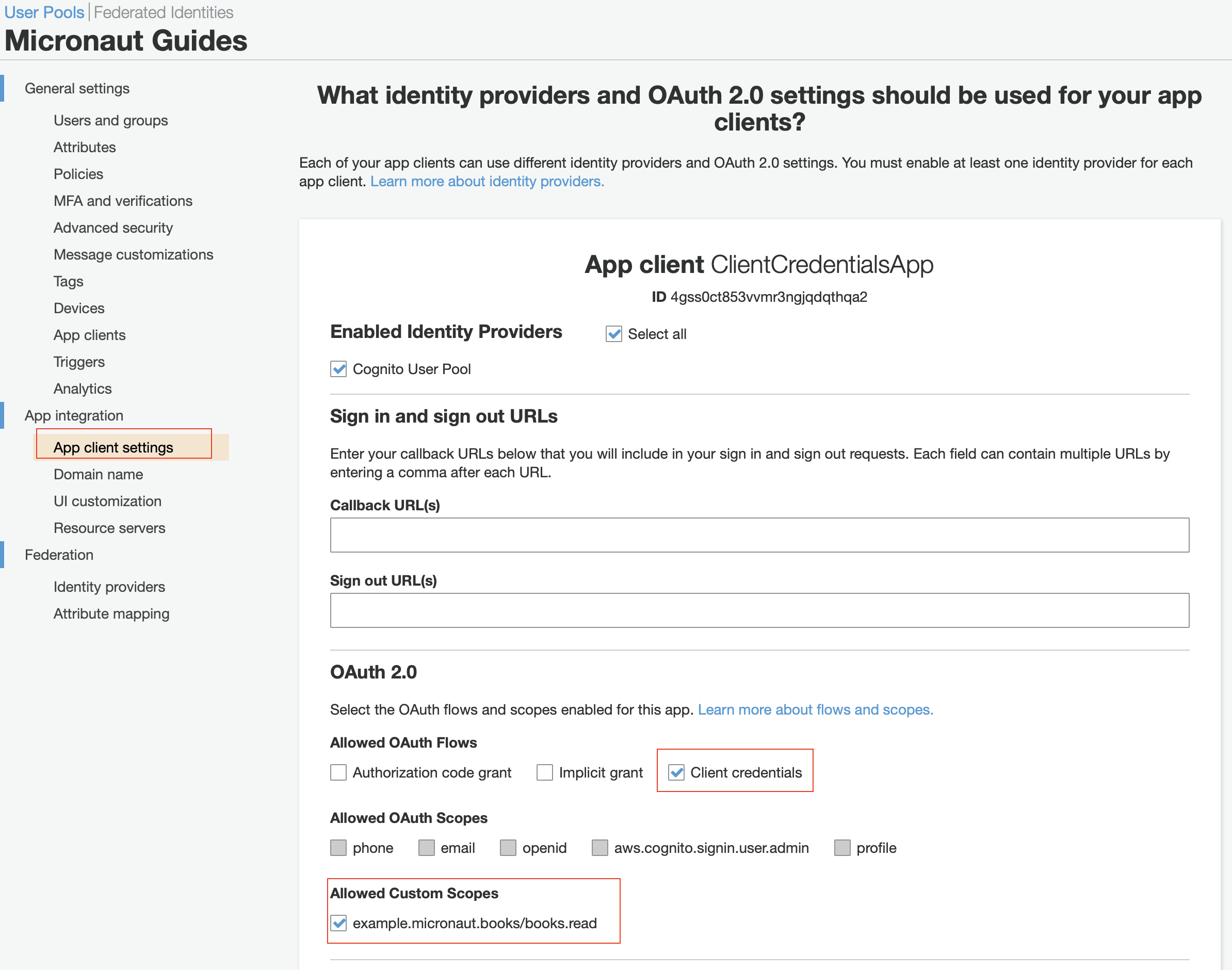
In the App Client Settings, define Client Credentials as the selected OAuth 2.0 flow and check the custom scope you created in the previous step:
Writing the Application
Dependencies
Modify every application (bookcatalogue, bookinventory, and bookrecommendation). Add Micronaut JWT and Micronaut OAuth 2.0 dependencies:
implementation("io.micronaut.security:micronaut-security-oauth2")
implementation("io.micronaut.security:micronaut-security-jwt")
Changes to Book Inventory service
Annotate the controller’s method with @Secured:
To validate the tokens issued by Amazon Cognito, configure Validation with Remote JWKS:
micronaut.security.token.jwt.signatures.jwks.auth0.url=https://cognito-idp.${COGNITO_REGION:us-east-1}.amazonaws.com/${COGNITO_POOL_ID:us-east-1_blablabla}/.well-known/jwks.jsonYou can obtain the JWKS URL in the https://cognito-idp.${COGNITO_REGION}.amazonaws.com/${COGNITO_POOL_ID}/.well-known/openid-configuration endpoint.
Changes to Book Catalogue service
Annotate the controller’s method with @Secured:
To validate the tokens issued by Cognito, configure Validation with Remote JWKS:
micronaut.security.token.jwt.signatures.jwks.auth0.url=https://cognito-idp.${COGNITO_REGION:us-east-1}.amazonaws.com/${COGNITO_POOL_ID:us-east-1_blablabla}/.well-known/jwks.jsonYou can obtain the JWKS URL in the https://cognito-idp.${COGNITO_REGION}.amazonaws.com/${COGNITO_POOL_ID}/.well-known/openid-configuration endpoint.
Changes to Book Recommendations service
Books Controller security
The GET /books endpoint in the bookrecommendation service is open.
Annotate the controller’s method with @Secured:
Configuration of HTTP services URLs
Modify application-dev.properties to point the declarative HTTP clients to the other microservice URLs.
micronaut.http.services.bookcatalogue.url=http://localhost:8081
micronaut.http.services.bookinventory.url=http://localhost:8082
Configuration
Add the following OAuth2 configuration:
The previous configuration uses several placeholders with default values. You will need to set up your Amazon Cognito application’s OAUTH_CLIENT_ID, OAUTH_CLIENT_SECRET, and OAUTH_TOKEN_URL environment variables.
Running the Application
Run bookcatalogue microservice
export COGNITO_REGION=us-east-1
export COGNITO_POOL_ID=us-east-1_blablabla
To run the application, execute ./gradlew run.
...
14:28:34.034 [main] INFO  io.micronaut.runtime.Micronaut - Startup completed in 499ms. Server Running: http://localhost:8081
Run bookinventory microservice
export COGNITO_REGION=us-east-1
export COGNITO_POOL_ID=us-east-1_blablabla
To run the application, execute ./gradlew run.
...
14:31:13.104 [main] INFO  io.micronaut.runtime.Micronaut - Startup completed in 506ms. Server Running: http://localhost:8082
Run bookrecommendation microservice
export OAUTH_CLIENT_ID=XXXXXXXXXX
export OAUTH_CLIENT_SECRET=YYYYYYYYYY
export OAUTH_TOKEN_URL=https://micronautguide.auth.us-east-1.amazoncognito.com/oauth2/token
To run the application, execute ./gradlew run.
...
14:31:57.389 [main] INFO  io.micronaut.runtime.Micronaut - Startup completed in 523ms. Server Running: http://localhost:8080
You can run a cURL command to test the whole application:
curl http://localhost:8080/books[{"name":"Building Microservices"}]Generate a Micronaut Application Native Executable with GraalVM
We will use GraalVM, an advanced JDK with ahead-of-time Native Image compilation, to generate a native executable of this Micronaut application.
Compiling Micronaut applications ahead of time with GraalVM significantly improves startup time and reduces the memory footprint of JVM-based applications.
|
Note
|
Only Java and Kotlin projects support using GraalVM’s native-image tool. Groovy relies heavily on reflection, which is only partially supported by GraalVM.
|
GraalVM Installation
sdk install java 25.4.4+1-graalFor installation on Windows, or for a manual installation on Linux or Mac, see the GraalVM Getting Started documentation.
The previous command installs Oracle GraalVM, which is free to use in production and free to redistribute, at no cost, under the GraalVM Free Terms and Conditions.
Alternatively, you can use the GraalVM Community Edition:
sdk install java 25.4.4.1+1-graalceNative Executable Generation
To generate a native executable using Gradle, run:
./gradlew nativeCompileThe native executable is created in build/native/nativeCompile directory and can be run with build/native/nativeCompile/micronautguide.
It is possible to customize the name of the native executable or pass additional parameters to GraalVM:
Run the native executables and execute a cURL command to test the whole application:
curl http://localhost:8080/books[{"name":"Building Microservices"}]Next Steps
Read Micronaut OAuth 2.0 Documentation to learn more.
License
|
Note
|
All guides are released with an Apache License 2.0 for the code and a Creative Commons Attribution 4.0 license for the writing and media (images). |