

Micronaut Token Propagation
Learn how to leverage token propagation in the Micronaut framework to simplify your code while keeping your microservices secure.
On this guide
In this section
Getting Started
Let’s describe the microservices you will build through the guide.
-
gateway- A microservice secured via JWT that exposes an endpoint/user. The output of that endpoint is the result of consuming theuserechoendpoint. -
userecho- A microservice secured via JWT that exposes an endpoint/userthat responds with the username of the authenticated user.
The next diagram illustrates the flow:
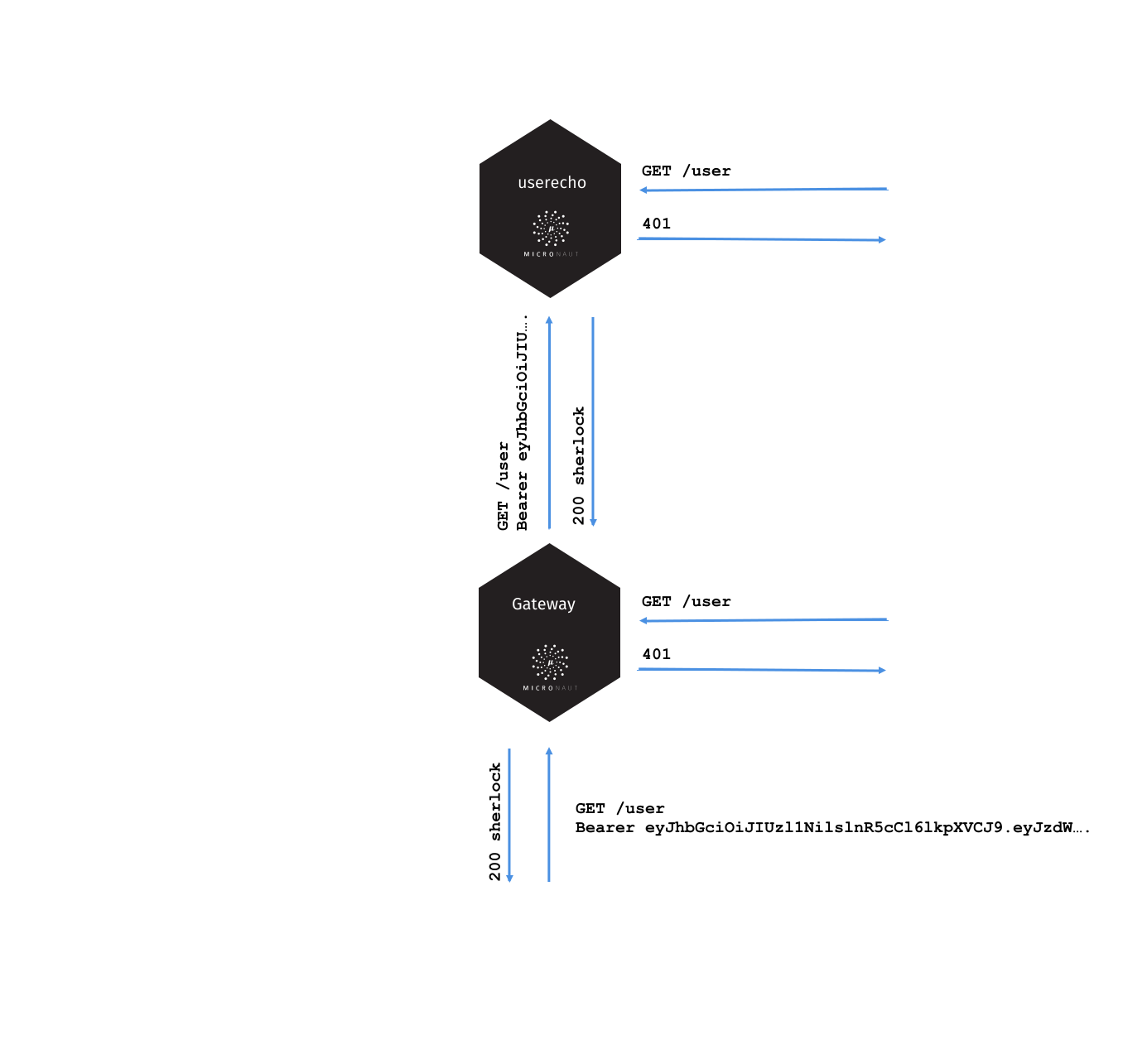
We generate a valid JWT in the gateway microservice. Then every microservice in our application is able to validate this JWT. We want every internal request to contain a valid JWT token. If we want to talk to another microservice we need to propagate the valid JWT get received.
What you will need
To complete this guide, you will need the following:
-
Some time on your hands
-
A decent text editor or IDE (e.g. IntelliJ IDEA)
-
JDK 21 or greater installed with
JAVA_HOMEconfigured appropriately
Solution
We recommend that you follow the instructions in the next sections and create the application step by step. However, you can go right to the completed example.
-
Download and unzip the source
Writing the Application
We will write the application first without token propagation. Then we will configure token propagation, and you will see how much code we can remove.
Gateway
Create the microservice:
mn create-app example.micronaut.gateway --build=gradle --lang=javaAdd the security-jwt module to the configuration:
annotationProcessor("io.micronaut.security:micronaut-security-processor")
implementation("io.micronaut.security:micronaut-security-jwt")
To keep this guide simple, create a naive AuthenticationProvider to simulate user’s authentication.
Create a class UserController that exposes the /user endpoint.
Create an interface to encapsulate the collaboration with the userecho microservice.
imports
package example.micronaut;

import io.micronaut.http.annotation.Header;
import reactor.core.publisher.Mono;
public interface UsernameFetcher {
Mono<String> findUsername(@Header("Authorization") String authorization);
}Create a Micronaut HTTP Declarative client:
Add this snippet to application.properties to configure the service URL of the echo service
Add this snippet to application.properties to configure security:
Tests
Provide a UsernameFetcher bean replacement for the Test environment.
imports
package example.micronaut;

import io.micronaut.context.annotation.Requires;
import io.micronaut.http.annotation.Header;
import jakarta.inject.Singleton;
import reactor.core.publisher.Mono;

import static io.micronaut.context.env.Environment.TEST;@Requires(env = TEST)
@Singleton
public class UserEchoClientReplacement implements UsernameFetcher {
@Override
public Mono<String> findUsername(@Header("Authorization") String authorization) {
return Mono.just("sherlock");
}
}Create tests to verify the application is secured and we can access it after login:
User echo
Create the microservice:
mn create-app example.micronaut.userecho --build=gradle --lang=javaAdd the security-jwt module to the configuration:
annotationProcessor("io.micronaut.security:micronaut-security-processor")
implementation("io.micronaut.security:micronaut-security-jwt")
Create a class UserController that exposes the /user endpoint.
Add this snippet to application.properties to change the port where userecho starts:
Add this snippet to application.properties
Token Propagation
As you can see, propagating the JWT token to other microservices in our application complicates the code.
We need to capture the Authorization header in the controller method arguments and then pass it to the @Client bean.
In an application with several controllers and declarative clients, it can lead to a lot of repetition. Fortunately, the Framework includes a feature called token propagation. We can tell our application to propagate the incoming token to a set of outgoing requests.
Let’s configure token propagation. We need to modify application.properties in the gateway microservice:
We can simplify the code:
Edit UserController.java and remove the @Header parameter:
imports
package example.micronaut;

import io.micronaut.http.annotation.Controller;
import io.micronaut.http.annotation.Get;
import io.micronaut.http.annotation.Produces;
import io.micronaut.security.annotation.Secured;
import reactor.core.publisher.Mono;

import static io.micronaut.http.MediaType.TEXT_PLAIN;
import static io.micronaut.security.rules.SecurityRule.IS_AUTHENTICATED;@Controller("/user")
class UserController {
private final UsernameFetcher usernameFetcher;
UserController(UsernameFetcher usernameFetcher) {
this.usernameFetcher = usernameFetcher;
}
@Secured(IS_AUTHENTICATED)
@Produces(TEXT_PLAIN)
@Get
Mono<String> index() {
return usernameFetcher.findUsername();
}
}Edit UsernameFetcher.java and remove the @Header parameter:
imports
package example.micronaut;

import reactor.core.publisher.Mono;
public interface UsernameFetcher {
Mono<String> findUsername();
}Edit UserEchoClient.java and remove the @Header parameter:
imports
package example.micronaut;

import io.micronaut.context.annotation.Requires;
import io.micronaut.http.annotation.Consumes;
import io.micronaut.http.annotation.Get;
import io.micronaut.http.client.annotation.Client;
import reactor.core.publisher.Mono;

import static io.micronaut.context.env.Environment.TEST;
import static io.micronaut.http.MediaType.TEXT_PLAIN;@Client(id = "userecho")
@Requires(notEnv = TEST)
public interface UserEchoClient extends UsernameFetcher {
@Consumes(TEXT_PLAIN)
@Get("/user")
Mono<String> findUsername();
}Edit UserEchoClientReplacement.java and remove the @Header parameter:
imports
package example.micronaut;

import io.micronaut.context.annotation.Requires;
import jakarta.inject.Singleton;
import reactor.core.publisher.Mono;

import static io.micronaut.context.env.Environment.TEST;@Requires(env = TEST)
@Singleton
public class UserEchoClientReplacement implements UsernameFetcher {
@Override
public Mono<String> findUsername() {
return Mono.just("sherlock");
}
}Running the App
Run both microservices:
./gradlew run18:29:26.500 [main] INFO io.micronaut.runtime.Micronaut - Startup completed in 671ms. Server Running: http://localhost:8081./gradlew run18:28:35.723 [main] INFO io.micronaut.runtime.Micronaut - Startup completed in 707ms. Server Running: http://localhost:8080Send a curl request to authenticate:
curl -X "POST" "http://localhost:8080/login" \
     -H 'Content-Type: application/json; charset=utf-8' \
-d $'{"username": "sherlock", "password": "password"}'{"username":"sherlock","access_token":"eyJhbGciOiJIUzI1NiJ9.eyJzdWIiOiJzaGVybG9jayIsIm5iZiI6MTYxNTkxMDM3Nywicm9sZXMiOltdLCJpc3MiOiJnYXRld2F5IiwiZXhwIjoxNjE1OTEzOTc3LCJpYXQiOjE2MTU5MTAzNzd9.nWoaNq9YzRzYKDBvDw_QaiUyVyIoc6rHCW_vLfnrtQ8","token_type":"Bearer","expires_in":3600}Now you can call the /user endpoint supplying the access token in the Authorization header.
curl "http://localhost:8080/user" -H 'Authorization: Bearer eyJhbGciOiJIUzI1NiJ9.eyJzdWIiOiJzaGVybG9jayIsIm5iZiI6MTYxNTkxMDM3Nywicm9sZXMiOltdLCJpc3MiOiJnYXRld2F5IiwiZXhwIjoxNjE1OTEzOTc3LCJpYXQiOjE2MTU5MTAzNzd9.nWoaNq9YzRzYKDBvDw_QaiUyVyIoc6rHCW_vLfnrtQ8'sherlockGenerate a Micronaut Application Native Executable with GraalVM
We will use GraalVM, an advanced JDK with ahead-of-time Native Image compilation, to generate a native executable of this Micronaut application.
Compiling Micronaut applications ahead of time with GraalVM significantly improves startup time and reduces the memory footprint of JVM-based applications.
|
Note
|
Only Java and Kotlin projects support using GraalVM’s native-image tool. Groovy relies heavily on reflection, which is only partially supported by GraalVM.
|
GraalVM Installation
sdk install java 25.4.4+1-graalFor installation on Windows, or for a manual installation on Linux or Mac, see the GraalVM Getting Started documentation.
The previous command installs Oracle GraalVM, which is free to use in production and free to redistribute, at no cost, under the GraalVM Free Terms and Conditions.
Alternatively, you can use the GraalVM Community Edition:
sdk install java 25.4.4.1+1-graalceNative Executable Generation
To generate a native executable using Gradle, run:
./gradlew nativeCompileThe native executable is created in build/native/nativeCompile directory and can be run with build/native/nativeCompile/micronautguide.
It is possible to customize the name of the native executable or pass additional parameters to GraalVM:
After creating the native executables for both microservices, start them and send the same curl requests as before to check that everything works using GraalVM native executables.
Next Steps
Read more about Token Propagation and Micronaut Security.
License
|
Note
|
All guides are released with an Apache License 2.0 for the code and a Creative Commons Attribution 4.0 license for the writing and media (images). |